Spreadsheet icon

Puter Spreadsheet: a free, open-source Microsoft Excel alternative

A fast spreadsheet with an AI assistant, 500+ formulas and charts — saved as real .xlsx files.

  • Office
  • Free · AGPL-3.0
  • Runs in the browser
  • No sign-up needed
  • alpha

From the official README: this app is in early alpha. Features may change and data could be lost — don’t rely on it for real work yet, and keep copies of anything important.

Spreadsheet screenshot
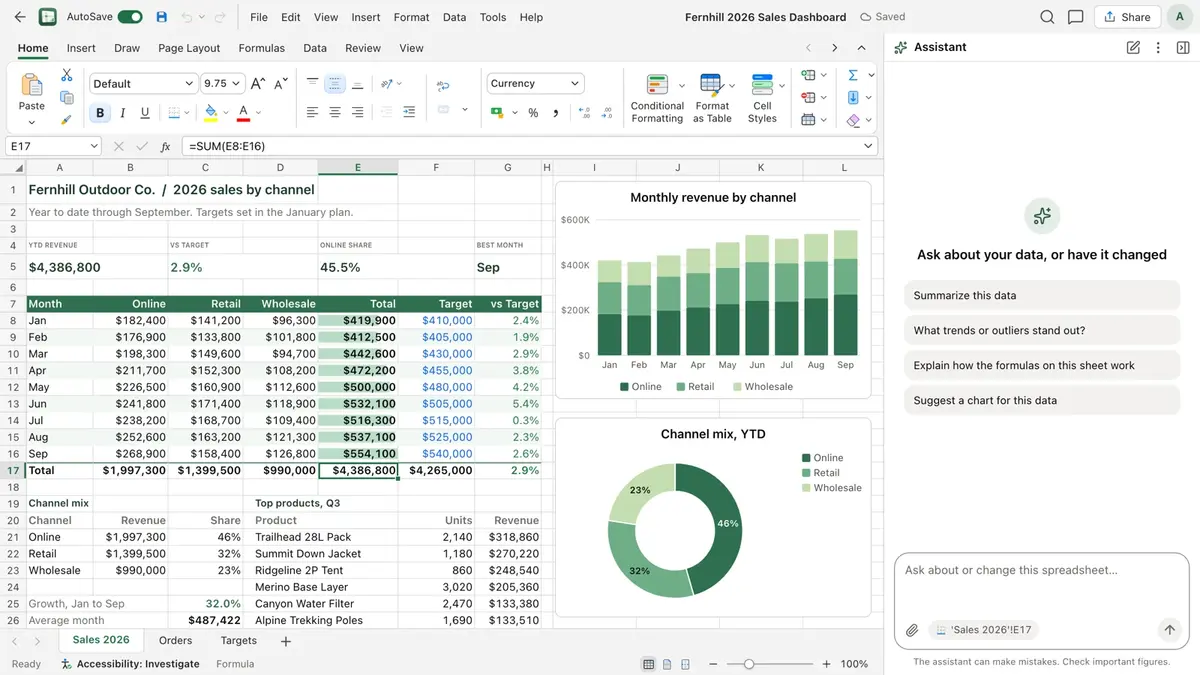
Spreadsheet interface. Screenshot from the official HeyPuter/everything repository.

What is Spreadsheet?

Spreadsheet opens straight into a new sheet with no sign-in. It has the tools you expect from Excel — over 500 functions with autocomplete and plain-language hints, charts that update with your numbers — plus an AI assistant that can add a totals row, write a formula, sort a list or build a chart for you, with one Undo for the whole reply. Files save as standard .xlsx, so they open in Excel, Numbers or LibreOffice.

Key features

  • 500+ functions for math, statistics, lookups, dates, text and finance
  • Built-in AI assistant: totals, formulas, formatting, sorting and charts
  • Column, bar, line, pie, donut, combo, scatter and waterfall charts
  • Saves as .xlsx in your own Puter cloud, with version history
  • Works on desktop, tablet and phone, in light or dark mode

How to use it

  1. Open spreadsheet.puter.com in any modern browser — computer, tablet or phone.
  2. Start right away — no sign-up. Sign in with a free Puter account only if you want to save to the cloud.
  3. Want to self-host or hack on it? Run it locally (Node.js 22.12 or newer):
git clone https://github.com/HeyPuter/everything.git
cd everything/src/spreadsheet
npm install
npm run dev

Replaces Microsoft Word · Google Docs · Apple Pages

A browser word processor that edits real .docx files, with comments and Track Changes.

Presentation

No sign-up

Replaces Microsoft PowerPoint · Google Slides · Apple Keynote

Create, edit and present real .pptx slides in the browser, with an AI helper and presenter view.

Replaces Miro · Microsoft Whiteboard · FigJam

An infinite canvas to sketch, plan and brainstorm — alone or together in real time.

PDF

No sign-up

Replaces Adobe Acrobat · PDF Expert

Edit text, fill forms, sign, comment and organise pages — every PDF task in one tab.

Notes

Source only

Replaces Microsoft OneNote · Evernote · Apple Notes

A free-form digital notebook: write anywhere on the page, draw by hand, tag and search.

Records

alpha

Replaces Airtable · Microsoft Access · Baserow

A relational database that feels like a spreadsheet — grid, board, calendar, gallery and form views.

FAQ

Is Spreadsheet free?

Yes. Spreadsheet is part of the Everything Project and its source code is published on GitHub under the AGPL-3.0 license. There is no subscription or trial.

Do I need to install Spreadsheet?

No. Open spreadsheet.puter.com in the browser on your computer, tablet or phone.

Do I need an account to use Spreadsheet?

Not required. It works straight away and keeps data in your browser or on your device; sign in with a free Puter account to save to the cloud.

Can Spreadsheet replace Microsoft Excel?

Not fully yet. Spreadsheet is in alpha: features will change, and its README asks you not to rely on it for real work or important data. Try it out, and keep backups of anything important.

Summarised from Spreadsheet’s README in the official repository. CraftSuite is an independent, unofficial guide and is not affiliated with Puter; Microsoft Excel, Google Sheets and Apple Numbers are trademarks of their respective owners.

Your download has started

Install

Star on GitHub Join the Discord

While it downloads — two more tools from our team Sponsored

AiLoft · All-in-one AI image & video studioFree credits on sign-up · one-time packs that never expire, save up to 20% PixelSniff · Is this image AI-generated? Find out in seconds5 free checks a day, no sign-up · free credits for deep reports

Download didn’t start? Try again