
LightCraft Download — Free, Open-Source Lightroom Alternative
LightCraft is an open-source, clean-room reimplementation of Adobe Lightroom in pure Rust: a photo library plus a scene-referred RAW developer with its own decoders for Canon, Nikon, Sony, Fujifilm and more. Local-first — no account, no cloud, no subscription.
- 16,381 stars
- Latest: v0.21.1
- Released Nov 12, 2026
- License: Apache-2.0
- Alpha
- Ready for real work: ~62%
- Checked against GitHub 14 min ago
brew install --cask lightcraft These are desktop apps. Send yourself the link and download on your Windows, Mac or Linux computer.
Unofficial guide — not affiliated with ArtCraft, Adobe, Microsoft or any other vendor. All downloads link to the official GitHub Releases.
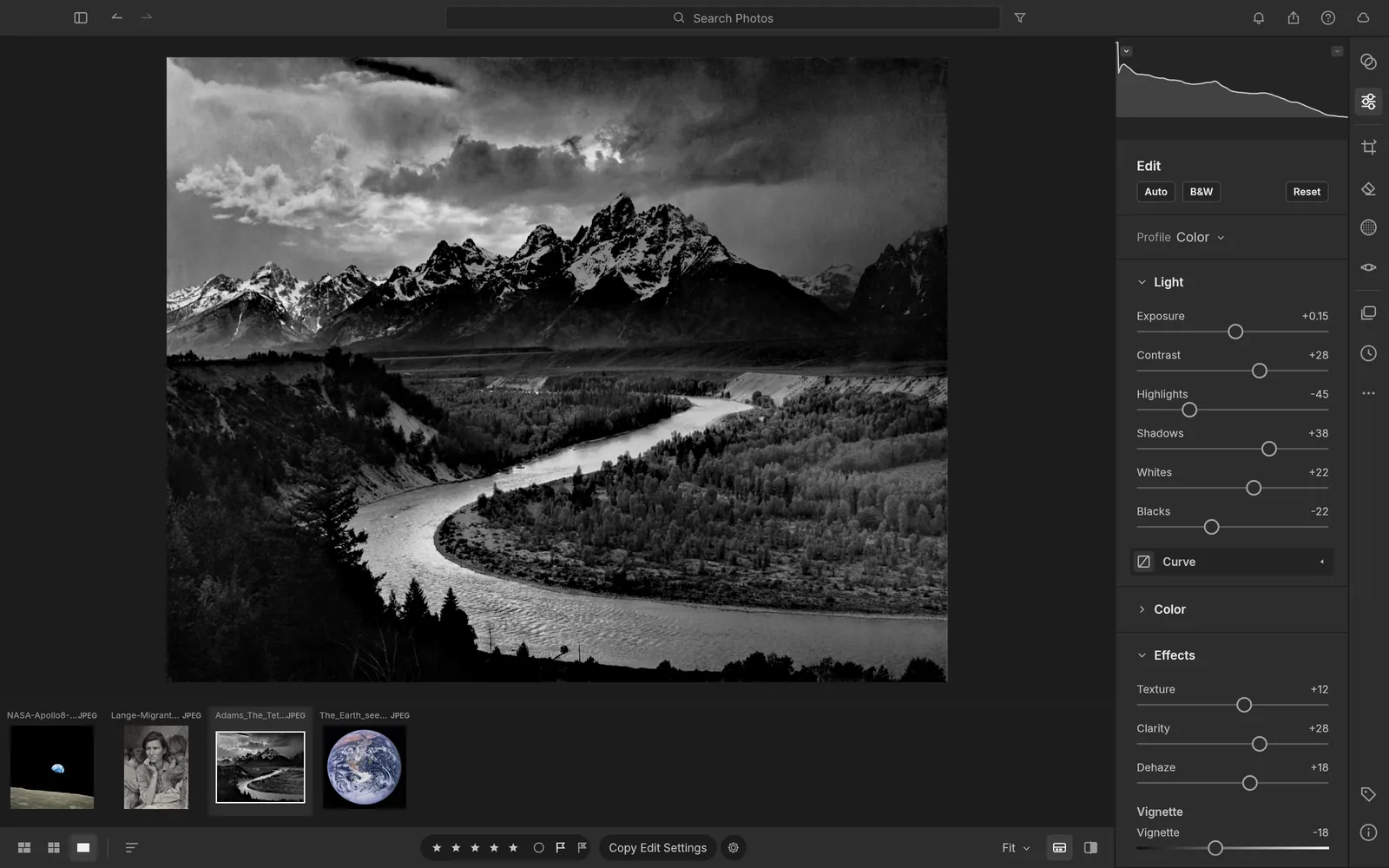
LightCraft features
RAW development
Exposure, contrast, highlights/shadows, white balance, Texture, Clarity and Dehaze with edge-aware local tone mapping.
Own RAW decoders
DNG, Canon CR2/CR3, Sony ARW, Nikon NEF, Fujifilm RAF (incl. X-Trans), Panasonic RW2, Pentax PEF, Olympus ORF.
Photo library
Folders, ratings (0–5), pick/reject flags, Recently Deleted and contact-sheet PDF export.
GPU-accelerated
The whole develop pipeline runs as wgpu compute kernels, with an identical CPU fallback.
Instant culling
Embedded previews appear within ~0.1 s while the full render finishes in the background.
Local-first & private
No account, no cloud, no telemetry. Also opens JPEG, PNG, TIFF, WebP, JPEG XL and PSD composites.
We installed LightCraft: first-run notes
Tested LightCraft 0.9.1 on Oct 20, 2026 · Ubuntu 24.04, 4 vCPU, 16 GB RAM, no GPU (software rendering) · How we test
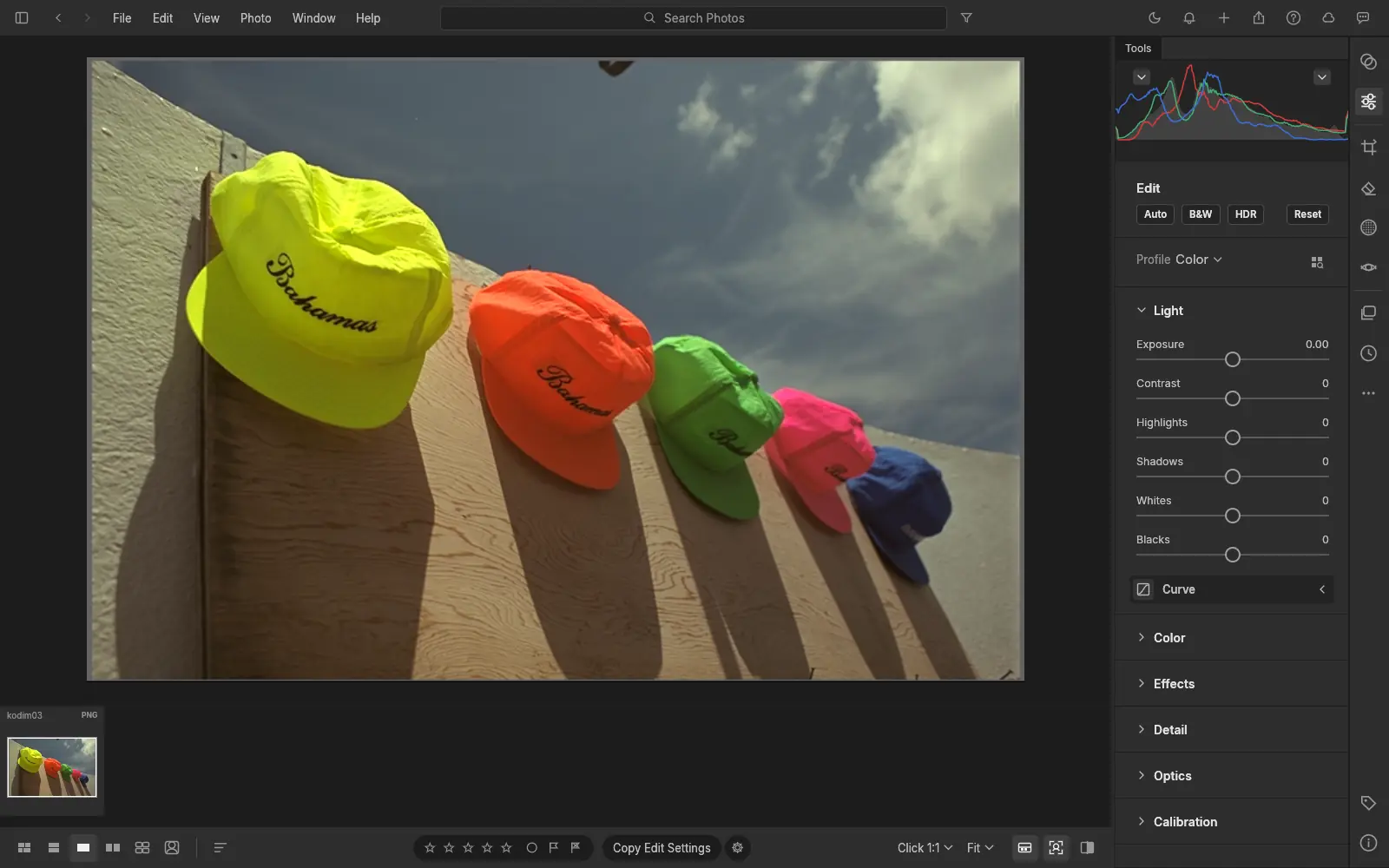
- Opening an image adds it to the library (grouped by date) and a double-click switches to editing with Light, Color, Effects, Detail, Optics and Calibration panels.
- Edits are non-destructive and can be copied to other photos with “Copy Edit Settings”.
LightCraft vs Adobe Lightroom
Can LightCraft replace Lightroom? The key differences at a glance.
| LightCraft | Adobe Lightroom | |
|---|---|---|
| Price | Free | Paid subscription (Creative Cloud) |
| License | Open source (Apache-2.0) | Proprietary |
| Platforms | Windows, macOS, Linux, FreeBSD, Web | Windows, macOS |
| Files | RAW (DNG, CR2/CR3, ARW, NEF, RAF, RW2, PEF, ORF), JPEG, PNG, TIFF, WebP, JPEG XL, PSD composites | Native Lightroom formats |
| Account / cloud | No account, works offline, no telemetry | Adobe account required |
| AI agent control | Built-in CLI and MCP server | — |
| Maturity | Early alpha. By feature count ~79% of Lightroom; as a day-to-day replacement the project itself says nearer 60–70%. | Industry standard, mature |
Free Lightroom alternatives
- darktable Open source Win · Mac · Linux Powerful open-source RAW developer and photo library.
- RawTherapee Open source Win · Mac · Linux High-quality RAW processing with fine-grained control.
- digiKam Open source Win · Mac · Linux Photo management focused on large libraries and metadata.
All LightCraft downloads · v0.21.1
Every file links directly to the official GitHub Releases — nothing is re-hosted here. Third-party mirror sites are often several versions behind and can’t guarantee the files are untouched.
Windows Installation help →
| Format | Architecture | Size |
|---|---|---|
| Portable (.zip) lightcraft-0.21.1-windows-arm64-portable.zip | ARM64 | 112 MB |
| Installer (.msi) lightcraft-0.21.1-windows-arm64.msi | ARM64 | 91.1 MB |
| Portable (.zip) lightcraft-0.21.1-windows-x64-portable.zip | x64 / x86_64 | 117 MB |
| Installer (.msi) lightcraft-0.21.1-windows-x64.msi | x64 / x86_64 | 95.4 MB |
macOS Installation help →
| Format | Architecture | Size |
|---|---|---|
| Disk image (.dmg) lightcraft-0.21.1-macos-universal.dmg | Universal (Apple silicon + Intel) | 121 MB |
| CLI · Archive (.zip) lightcraft-cli-0.21.1-macos-universal.zip | Universal (Apple silicon + Intel) | 116 MB |
Linux Installation help →
| Format | Architecture | Size |
|---|---|---|
| AppImage lightcraft-0.21.1-linux-aarch64.AppImage | ARM64 | 105 MB |
| Debian / Ubuntu (.deb) lightcraft-0.21.1-linux-aarch64.deb | ARM64 | 114 MB |
| Flatpak lightcraft-0.21.1-linux-aarch64.flatpak | ARM64 | 78.8 MB |
| Tarball (.tar.gz) lightcraft-0.21.1-linux-aarch64.pkg.tar.zst | ARM64 | 87.3 MB |
| Fedora / openSUSE (.rpm) lightcraft-0.21.1-linux-aarch64.rpm | ARM64 | 113 MB |
| Tarball (.tar.gz) lightcraft-0.21.1-linux-aarch64.tar.gz | ARM64 | 112 MB |
| Debian / Ubuntu (.deb) lightcraft-0.21.1-linux-riscv64.deb | — | 115 MB |
| Fedora / openSUSE (.rpm) lightcraft-0.21.1-linux-riscv64.rpm | — | 115 MB |
| Tarball (.tar.gz) lightcraft-0.21.1-linux-riscv64.tar.gz | — | 114 MB |
| AppImage lightcraft-0.21.1-linux-x86_64.AppImage | x64 / x86_64 | 110 MB |
| Debian / Ubuntu (.deb) lightcraft-0.21.1-linux-x86_64.deb | x64 / x86_64 | 119 MB |
| Flatpak lightcraft-0.21.1-linux-x86_64.flatpak | x64 / x86_64 | 83.6 MB |
| Tarball (.tar.gz) lightcraft-0.21.1-linux-x86_64.pkg.tar.zst | x64 / x86_64 | 90.3 MB |
| Fedora / openSUSE (.rpm) lightcraft-0.21.1-linux-x86_64.rpm | x64 / x86_64 | 118 MB |
| Tarball (.tar.gz) lightcraft-0.21.1-linux-x86_64.tar.gz | x64 / x86_64 | 117 MB |
FreeBSD
| Format | Architecture | Size |
|---|---|---|
| Tarball (.tar.gz) lightcraft-0.21.1-freebsd-aarch64.tar.gz | ARM64 | 111 MB |
| Tarball (.tar.gz) lightcraft-0.21.1-freebsd-x86_64.tar.gz | x64 / x86_64 | 116 MB |
Web (WebAssembly)
| Format | Architecture | Size |
|---|---|---|
| Archive (.zip) lightcraft-web-0.21.1.zip | — | 71.1 MB |
How to install LightCraft
Windows
Download the .msi and double-click it. If SmartScreen appears, click “More info → Run anyway”. A portable .zip is also available.
macOS
Open the .dmg and drag LightCraft to Applications. The universal build runs on Apple silicon and Intel. Seeing “cannot verify the developer”? See the fix.
Linux
AppImage: chmod +x and run. .deb, .rpm, Flatpak and tarballs are also provided; glibc 2.35+ is required.
What's new: LightCraft v0.21.1
v0.21.1 · Released Nov 12, 2026
What's Changed
- security(raw): shared header-scan budget for tagged previews, tile-sized lossy JPEG budget, bound deflate tile padding by @dylanmtaylor in https://github.com/storytold/lightcraft/pull/3695
- security: O(width) box-blur priming, case-insensitive download names, stats walk skips directory links by @dylanmtaylor in https://github.com/storytold/lightcraft/pull/3729
- security(engine): read user-named files through the opened regular file under a byte cap by @dylanmtaylor in https://github.com/storytold/lightcraft/pull/3703
- Release: LightCraft v0.21.0 on main by @FredApps in https://github.com/storytold/lightcraft/pull/4153
- security: mask.exportEffects refuses originals and sidecars, writes atomically by @dylanmtaylor in https://github.com/storytold/lightcraft/pull/4125
- CI: nightly release dry run by @FredApps in https://github.com/storytold/lightcraft/pull/4154
- Use craft-tiff from craft-libs for TIFF/IFD by @dylanmtaylor in https://github.com/storytold/lightcraft/pull/4088
- Fix Flatpak updates and bump to 0.21.1 by @dylanmtaylor in https://github.com/storytold/lightcraft/pull/4151
Full Changelog: https://github.com/storytold/lightcraft/compare/v0.21.0...v0.21.1
LightCraft FAQ
Which cameras does LightCraft support?
Can LightCraft import my Lightroom catalog?
Are the ArtCraft apps free?
Are the downloads safe?
Are they affiliated with Adobe or Microsoft?
LightCraft guides, comparisons & answers
Sponsored
Two more tools from the CraftSuite team
Prove your photos are real, or spot AI fakes in a batch you received.
 PixelSniffIs this image AI-generated? Find out in seconds
- Several detection models combined into one clear score
- Deep analysis: highlighted AI areas, watermark & metadata checks, plain-language report
- Catches Midjourney, DALL·E, Stable Diffusion, Flux, Gemini and deepfakes
 AiLoftAll-in-one AI image & video studio
- GPT Image 2, Nano Banana Pro & video models in one place
- Up to 4K output, commercial use included
- No GPU, no install — runs in your browser
Other ArtCraft apps
 Mister Download ManagerIDM alternative
- PhotoCraftPhotoshop alternative
- VectorCraftIllustrator alternative
- FilmCraftPremiere Pro alternative
- PdfCraftAcrobat alternative
- EffectCraftAfter Effects alternative
- DesignCraftInDesign alternative
- WordCraftWord alternative
- GridCraftExcel alternative
- DeckCraftPowerPoint alternative
- CADCraftAutoCAD alternative
- SoundCraftPro Tools alternative
- FigCraftFigma alternative
- ArtCraft LauncherInstall & update every app