
FilmCraft Download — Free, Open-Source Premiere Pro Alternative
FilmCraft is an open-source, clean-room take on the Adobe Premiere Pro workflow, written in pure Rust. Source and Program monitors, bins, a multi-track timeline, Lumetri-style color grading, an audio mixer and its own H.264 encoder — native on Windows, macOS, Linux and in the browser.
- 18,980 stars
- Latest: v0.20.1
- Released Nov 12, 2026
- License: Apache-2.0
- Alpha
- Ready for real work: ~56%
- Checked against GitHub 14 min ago
brew install --cask filmcraft These are desktop apps. Send yourself the link and download on your Windows, Mac or Linux computer.
Unofficial guide — not affiliated with ArtCraft, Adobe, Microsoft or any other vendor. All downloads link to the official GitHub Releases.
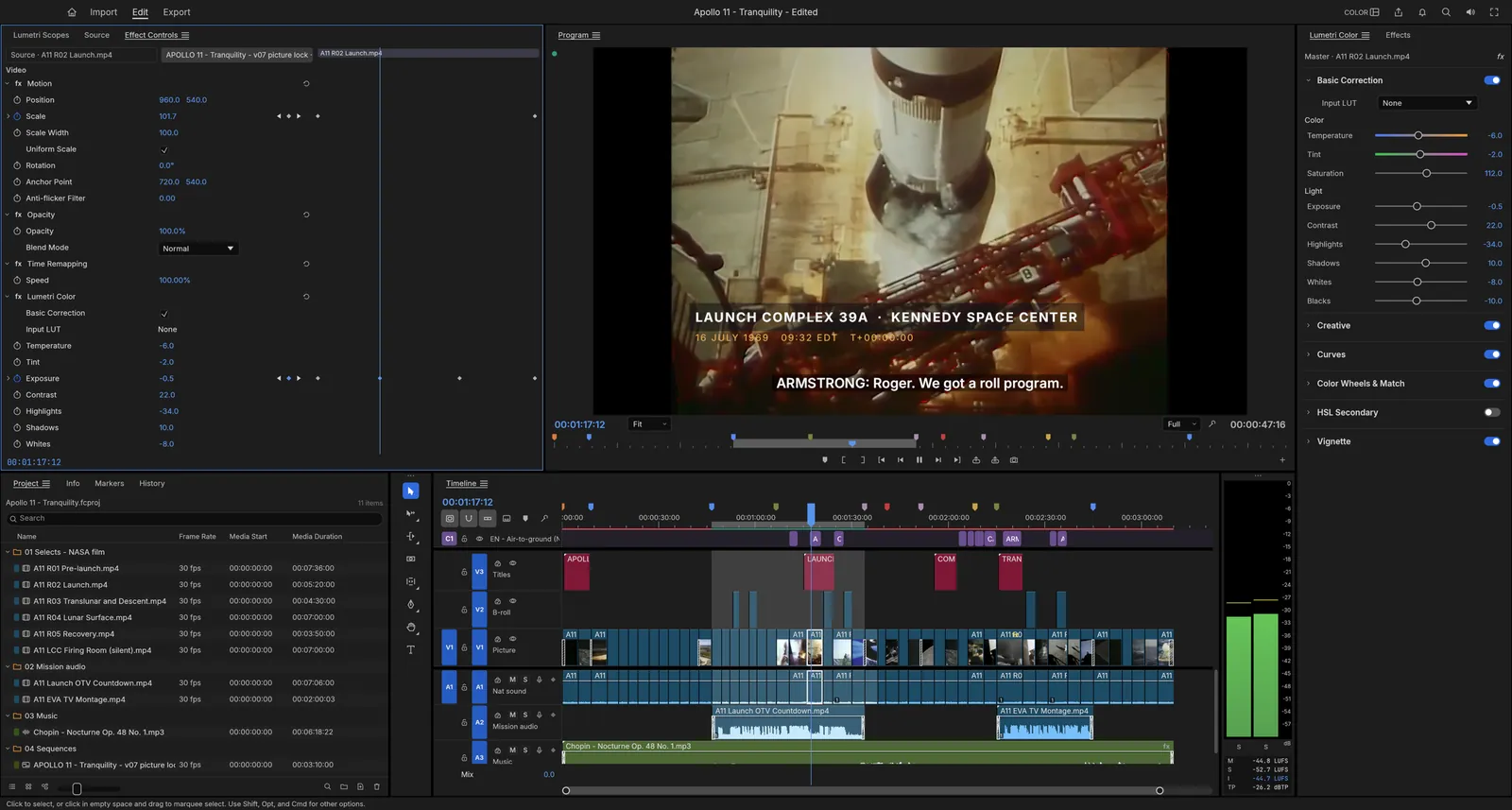
FilmCraft features
A timeline you already know
Source/Program monitors, bins, patching and targeting, three-point editing, ripple/roll/slip/slide trims and the Trim Monitor.
Lumetri-style color
Basic Correction, Creative looks, RGB and hue curves, color wheels, HSL Secondary and vignette.
93 video effects + transitions
Premiere 26’s full Video Effects bin, Ultra Key, Warp Stabilizer, around 30 transitions and Bezier keyframes.
Pro audio
Track and clip mixers, EBU R128 loudness meters, EQ, DeNoise, DeHummer and automation modes.
Captions & titles
SRT, WebVTT and SCC import/export, CEA-608/708 caption tracks, and a real OpenType text engine.
Export without FFmpeg
H.264 MP4 with AAC via its own encoders, plus ProRes 422 HQ, MXF, PNG sequences, GIF and WAV.
We installed FilmCraft: first-run notes
Tested FilmCraft 0.9.0 on Oct 20, 2026 · Ubuntu 24.04, 4 vCPU, 16 GB RAM, no GPU (software rendering) · How we test
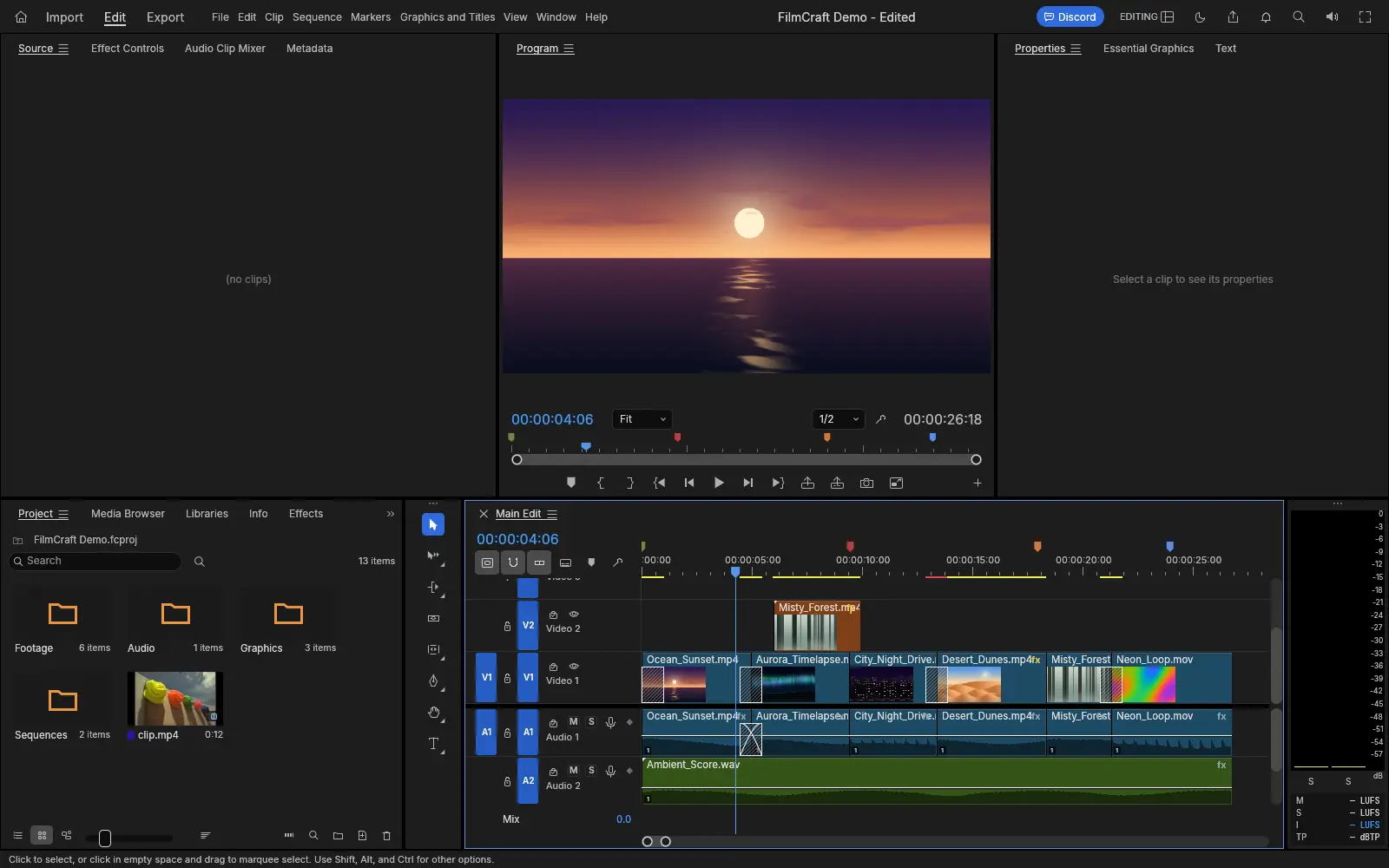
- The first launch loads a demo project with two video tracks, two audio tracks, markers and transitions, which is a quick way to learn the layout.
- Our H.264 MP4 (1280×720, 30 fps) imported without any extra codec install.
FilmCraft vs Adobe Premiere Pro
Can FilmCraft replace Premiere Pro? The key differences at a glance.
| FilmCraft | Adobe Premiere Pro | |
|---|---|---|
| Price | Free | Paid subscription (Creative Cloud) |
| License | Open source (Apache-2.0) | Proprietary |
| Platforms | Windows, macOS, Linux, FreeBSD, Web | Windows, macOS |
| Files | MP4 (H.264/AAC), ProRes 422 HQ, MXF, PNG sequences, GIF, WAV, SRT/VTT/SCC captions | Native Premiere Pro formats |
| Account / cloud | No account, works offline, no telemetry | Adobe account required |
| AI agent control | Built-in CLI and MCP server | — |
| Maturity | Early alpha. Good for learning and lighter edits; test thoroughly before relying on it for deadline work. | Industry standard, mature |
Free Premiere Pro alternatives
- Kdenlive Open source Win · Mac · Linux Full-featured open-source multi-track video editor from KDE.
- Shotcut Open source Win · Mac · Linux Lightweight open-source editor with wide format support.
- DaVinci Resolve Free, not open source Win · Mac · Linux Hollywood-grade editing and color grading; free version, not open source.
All FilmCraft downloads · v0.20.1
Every file links directly to the official GitHub Releases — nothing is re-hosted here. Third-party mirror sites are often several versions behind and can’t guarantee the files are untouched.
Windows Installation help →
| Format | Architecture | Size |
|---|---|---|
| Portable (.zip) filmcraft-0.20.1-windows-arm64-portable.zip | ARM64 | 104 MB |
| Installer (.msi) filmcraft-0.20.1-windows-arm64.msi | ARM64 | 84.9 MB |
| Portable (.zip) filmcraft-0.20.1-windows-x64-portable.zip | x64 / x86_64 | 108 MB |
| Installer (.msi) filmcraft-0.20.1-windows-x64.msi | x64 / x86_64 | 89.1 MB |
macOS Installation help →
| Format | Architecture | Size |
|---|---|---|
| Disk image (.dmg) filmcraft-0.20.1-macos-universal.dmg | Universal (Apple silicon + Intel) | 113 MB |
| CLI · Archive (.zip) filmcraft-cli-0.20.1-macos-universal.zip | Universal (Apple silicon + Intel) | 95.4 MB |
Linux Installation help →
| Format | Architecture | Size |
|---|---|---|
| AppImage filmcraft-0.20.1-linux-aarch64.AppImage | ARM64 | 98.1 MB |
| Debian / Ubuntu (.deb) filmcraft-0.20.1-linux-aarch64.deb | ARM64 | 106 MB |
| Flatpak filmcraft-0.20.1-linux-aarch64.flatpak | ARM64 | 74.5 MB |
| Tarball (.tar.gz) filmcraft-0.20.1-linux-aarch64.pkg.tar.zst | ARM64 | 82.4 MB |
| Fedora / openSUSE (.rpm) filmcraft-0.20.1-linux-aarch64.rpm | ARM64 | 105 MB |
| Tarball (.tar.gz) filmcraft-0.20.1-linux-aarch64.tar.gz | ARM64 | 103 MB |
| Debian / Ubuntu (.deb) filmcraft-0.20.1-linux-riscv64.deb | — | 104 MB |
| Fedora / openSUSE (.rpm) filmcraft-0.20.1-linux-riscv64.rpm | — | 103 MB |
| Tarball (.tar.gz) filmcraft-0.20.1-linux-riscv64.tar.gz | — | 102 MB |
| AppImage filmcraft-0.20.1-linux-x86_64.AppImage | x64 / x86_64 | 101 MB |
| Debian / Ubuntu (.deb) filmcraft-0.20.1-linux-x86_64.deb | x64 / x86_64 | 108 MB |
| Flatpak filmcraft-0.20.1-linux-x86_64.flatpak | x64 / x86_64 | 78.5 MB |
| Tarball (.tar.gz) filmcraft-0.20.1-linux-x86_64.pkg.tar.zst | x64 / x86_64 | 84.6 MB |
| Fedora / openSUSE (.rpm) filmcraft-0.20.1-linux-x86_64.rpm | x64 / x86_64 | 108 MB |
| Tarball (.tar.gz) filmcraft-0.20.1-linux-x86_64.tar.gz | x64 / x86_64 | 107 MB |
FreeBSD
| Format | Architecture | Size |
|---|---|---|
| Tarball (.tar.gz) filmcraft-0.20.1-freebsd-aarch64.tar.gz | ARM64 | 102 MB |
| Tarball (.tar.gz) filmcraft-0.20.1-freebsd-x86_64.tar.gz | x64 / x86_64 | 106 MB |
Web (WebAssembly)
| Format | Architecture | Size |
|---|---|---|
| Archive (.zip) filmcraft-web-0.20.1.zip | — | 14.9 MB |
How to install FilmCraft
Windows
Download the .msi and double-click it. If SmartScreen appears, click “More info → Run anyway”. A portable .zip is also available.
macOS
Open the .dmg and drag FilmCraft to Applications. The universal build runs on Apple silicon and Intel. Seeing “cannot verify the developer”? See the fix.
Linux
AppImage: chmod +x and run. .deb, .rpm, Flatpak and tarballs are also provided; glibc 2.35+ is required.
What's new: FilmCraft v0.20.1
v0.20.1 · Released Nov 12, 2026
What's Changed
- render: refuse mixer graphs whose latency or compensation delays are absurd by @dylanmtaylor in https://github.com/storytold/filmcraft/pull/4225
- audio-dsp: validate stored remix plans so pieces cannot stack on one output by @dylanmtaylor in https://github.com/storytold/filmcraft/pull/4104
- ci: run Harden-Runner on every job by @dylanmtaylor in https://github.com/storytold/filmcraft/pull/4672
- export: OpenEXR ZIP/ZIPS reuses the deflate hash tables across a frame's chunks (#4659) by @wanikhawar in https://github.com/storytold/filmcraft/pull/4666
- engine, ui: default screenshot, session log and voice-over folders go in a private temp folder by @dylanmtaylor in https://github.com/storytold/filmcraft/pull/4264
- Updates: take craft-update from craft-libs main at 6e03f65bf by @dylanmtaylor in https://github.com/storytold/filmcraft/pull/4675
- tests: write artifacts into a fresh private temp folder instead of a predictable name by @dylanmtaylor in https://github.com/storytold/filmcraft/pull/4260
- codecs: bound the search for a random-access sample and honour cancellation in it by @dylanmtaylor in https://github.com/storytold/filmcraft/pull/4229
- Fix Flatpak updates and bump to 0.20.1 by @dylanmtaylor in https://github.com/storytold/filmcraft/pull/4678
- audio: bound project-driven buffer sizes before allocating by @dylanmtaylor in https://github.com/storytold/filmcraft/pull/4170
- codecs: evict interior GOP cache frames when both ends are protected by @dylanmtaylor in https://github.com/storytold/filmcraft/pull/4187
- CI: nightly release dry run by @FredApps in https://github.com/storytold/filmcraft/pull/4684
- Audio codecs and Ogg come from craft-libs by @dylanmtaylor in https://github.com/storytold/filmcraft/pull/4676
New Contributors
- @wanikhawar made their first contribution in https://github.com/storytold/filmcraft/pull/4666
Full Changelog: https://github.com/storytold/filmcraft/compare/v0.20.0...v0.20.1
FilmCraft FAQ
Can FilmCraft use Premiere Pro keyboard shortcuts?
Is FilmCraft a good free Premiere alternative?
Are the ArtCraft apps free?
Are the downloads safe?
Are they affiliated with Adobe or Microsoft?
FilmCraft guides, comparisons & answers
Sponsored
Two more tools from the CraftSuite team
Need B-roll, a title card or a short clip you don’t have? Generate it with AI.
 AiLoftAll-in-one AI image & video studio
- GPT Image 2, Nano Banana Pro & video models in one place
- Up to 4K output, commercial use included
- No GPU, no install — runs in your browser
 PixelSniffIs this image AI-generated? Find out in seconds
- Several detection models combined into one clear score
- Deep analysis: highlighted AI areas, watermark & metadata checks, plain-language report
- Catches Midjourney, DALL·E, Stable Diffusion, Flux, Gemini and deepfakes
Other ArtCraft apps
 Mister Download ManagerIDM alternative
- PhotoCraftPhotoshop alternative
- VectorCraftIllustrator alternative
- LightCraftLightroom alternative
- PdfCraftAcrobat alternative
- EffectCraftAfter Effects alternative
- DesignCraftInDesign alternative
- WordCraftWord alternative
- GridCraftExcel alternative
- DeckCraftPowerPoint alternative
- CADCraftAutoCAD alternative
- SoundCraftPro Tools alternative
- FigCraftFigma alternative
- ArtCraft LauncherInstall & update every app