Notes icon

Puter Notes: a free, open-source Microsoft OneNote alternative

A free-form digital notebook: write anywhere on the page, draw by hand, tag and search.

  • Office
  • Free · AGPL-3.0
  • Runs in the browser

The official repository hasn’t published a hosted link for this app yet — you can run it from source with the steps below.

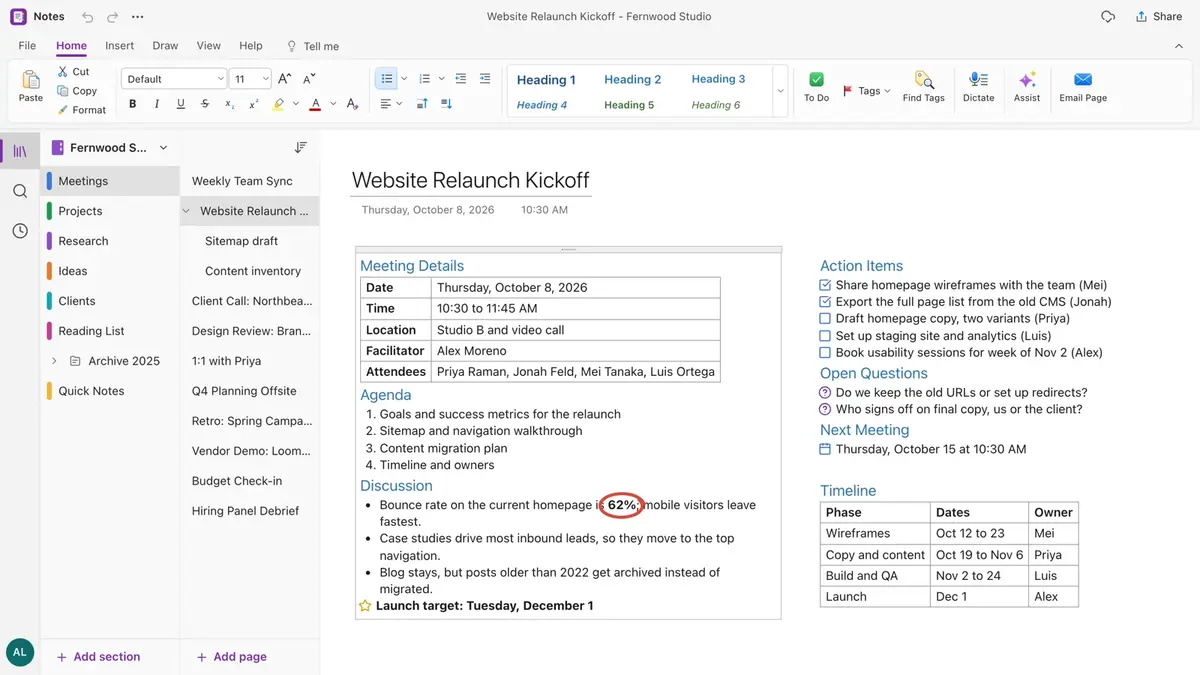
Notes screenshot
Notes interface. Screenshot from the official HeyPuter/everything repository.

What is Notes?

Notes works like a paper notebook that never runs out of pages. Click anywhere and start typing; lists, tables, pictures and sketches sit side by side. Organise with notebooks, coloured sections and pages, tag to-dos and questions, handwrite with pens and highlighters, and search every notebook at once.

Key features

  • Free-form pages: click anywhere to write, move and resize notes
  • Notebooks, coloured sections, section groups, pages and subpages
  • To-do / Important / Question tags with a summary across notebooks
  • Pens, highlighters, lasso and shapes for handwriting
  • Page versions, 60-day restore and export to HTML, Markdown or PDF

How to use it

  1. No hosted version yet — run it from source with the commands below.
  2. Sign in with a free Puter account; your data is saved in your own Puter cloud storage.
  3. Want to self-host or hack on it? Run it locally (Node.js 22.12 or newer):
git clone https://github.com/HeyPuter/everything.git
cd everything/src/notes
npm install
npm run dev

Spreadsheet

No sign-up alpha

Replaces Microsoft Excel · Google Sheets · Apple Numbers

A fast spreadsheet with an AI assistant, 500+ formulas and charts — saved as real .xlsx files.

Replaces Microsoft Word · Google Docs · Apple Pages

A browser word processor that edits real .docx files, with comments and Track Changes.

Presentation

No sign-up

Replaces Microsoft PowerPoint · Google Slides · Apple Keynote

Create, edit and present real .pptx slides in the browser, with an AI helper and presenter view.

Replaces Miro · Microsoft Whiteboard · FigJam

An infinite canvas to sketch, plan and brainstorm — alone or together in real time.

PDF

No sign-up

Replaces Adobe Acrobat · PDF Expert

Edit text, fill forms, sign, comment and organise pages — every PDF task in one tab.

Records

alpha

Replaces Airtable · Microsoft Access · Baserow

A relational database that feels like a spreadsheet — grid, board, calendar, gallery and form views.

FAQ

Is Notes free?

Yes. Notes is part of the Everything Project and its source code is published on GitHub under the AGPL-3.0 license. There is no subscription or trial.

Do I need to install Notes?

The official hosted version hasn’t been published yet. You can run it locally with the “Run it from source” steps below (Node.js 22.12 or newer).

Do I need an account to use Notes?

A free Puter account. Your data is stored in your own Puter cloud storage.

Can Notes replace Microsoft OneNote?

For most everyday work, yes: free-form pages: click anywhere to write, move and resize notes; notebooks, coloured sections, section groups, pages and subpages; to-do / Important / Question tags with a summary across notebooks. If you depend on a specialised Microsoft OneNote feature, test it with your own files first.

Summarised from Notes’s README in the official repository. CraftSuite is an independent, unofficial guide and is not affiliated with Puter; Microsoft OneNote, Evernote and Apple Notes are trademarks of their respective owners.

Your download has started

Install

Star on GitHub Join the Discord

While it downloads — two more tools from our team Sponsored

AiLoft · All-in-one AI image & video studioFree credits on sign-up · one-time packs that never expire, save up to 20% PixelSniff · Is this image AI-generated? Find out in seconds5 free checks a day, no sign-up · free credits for deep reports

Download didn’t start? Try again