PdfCraft Download — Free, Open-Source Acrobat Alternative

PdfCraft (sometimes mistakenly called “PrintCraft”) is an open-source, clean-room reimplementation of Adobe Acrobat in pure Rust. Read, comment, fill forms, organize pages, combine, split, redact and sign PDFs — privately, with no account and no telemetry.

  • 21,684 stars
  • Latest: v0.22.0
  • Released Nov 23, 2026
  • License: Apache-2.0
  • Alpha
  • Ready for real work: ~50%
  • Checked against GitHub 14 min ago
Download PdfCraft
v0.22.0 · Released Nov 23, 2026
from official GitHub Releases
macOS · Homebrew: brew install --cask pdfcraft

Unofficial guide — not affiliated with ArtCraft, Adobe, Microsoft or any other vendor. All downloads link to the official GitHub Releases.

↓ Read our hands-on PdfCraft review: benchmarks and problems we hit

Source on GitHub Official page ↗

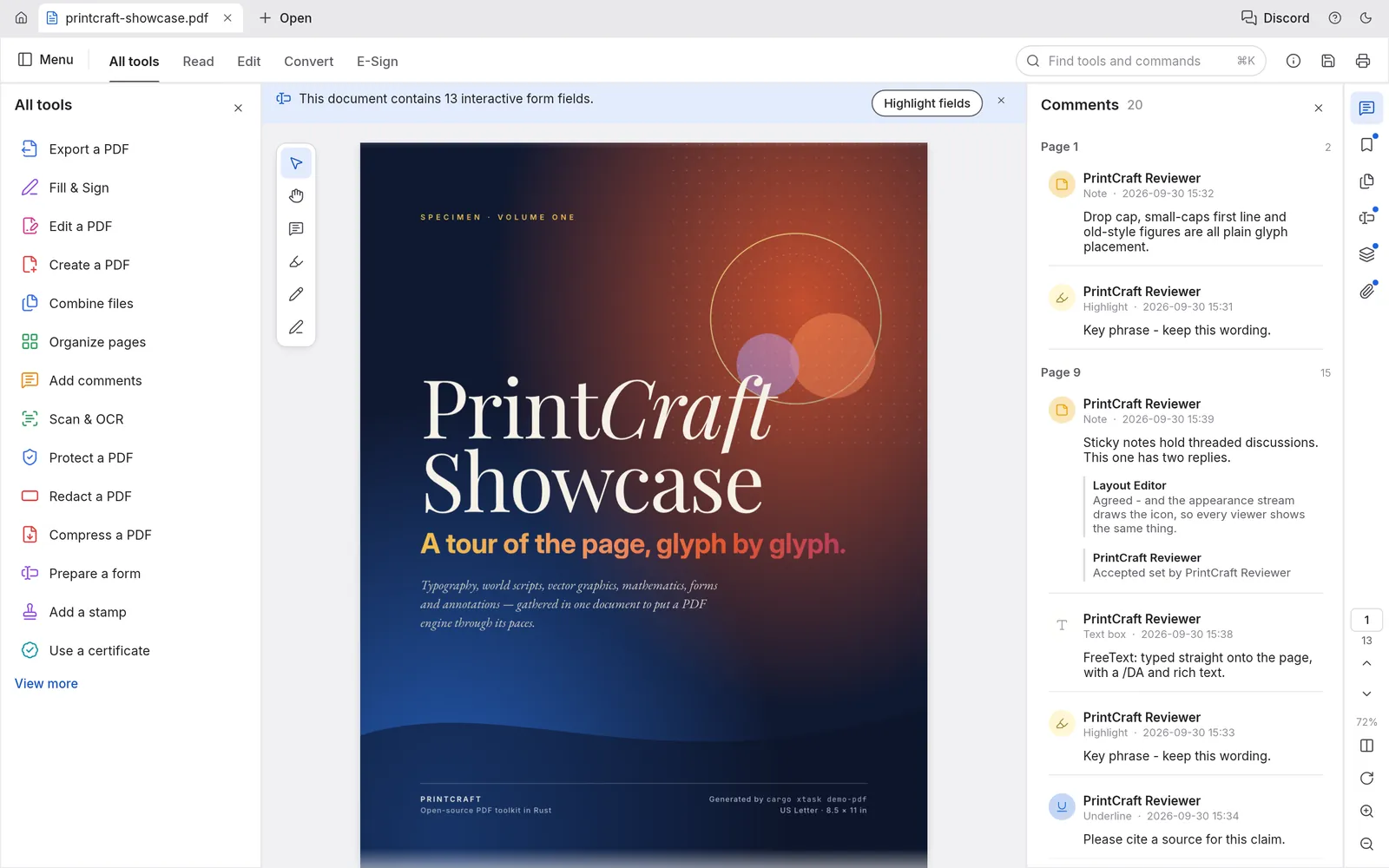
PdfCraft screenshot — open-source Acrobat alternative
Screenshot from the official PdfCraft repository (MIT / Apache-2.0)

PdfCraft features

Fast, sharp viewing

Tiled rendering keeps text crisp at any zoom; continuous, two-up, full-screen and distraction-free Read modes.

Organize pages

Rotate, delete, insert, reorder and extract pages, with undo that survives saving.

Combine & split

Merge any number of PDFs with bookmarks per file; split every n pages or at chosen pages.

Comments & forms

Most comment types, plus filling and authoring forms with sandboxed JavaScript.

Security

Passwords, redaction, sanitizing, basic digital signatures and an Accessibility Checker.

Robust

0 crashes across the 983-file pdf.js test corpus; damaged documents are repaired.

Hands-on review

PdfCraft 0.9.0 tested: can it do your everyday Acrobat work?

Version tested: PdfCraft 0.9.0 · Tested on Oct 20, 2026 · Machine: Ubuntu 24.04, 4 vCPU, 16 GB RAM, no GPU (software rendering) · Screenshots and recordings by CraftSuite · How we test

The verdict

  • It covers everyday PDF work: reading, organizing pages, filling forms, signing, editing text, true redaction, offline OCR and compression. All free, offline and without an account.
  • Fast and light: a 117-page textbook opened in 0.18 s using 223 MB of RAM, and compression took a 5.3 MB file to 2.0 MB with every word still searchable.
  • One clear rendering bug: pattern fills (hatching) are drawn wrongly. Some tools are still marked with future milestones (M7, M11, M12) and aren’t finished.

Test machine and files

We tested the official Linux AppImage from GitHub Releases (pdfcraft-0.9.0-linux-x86_64.AppImage, 82 MB) on the same machine as PhotoCraft:

Operating systemUbuntu 24.04.5 LTS (x86_64), X11 session
CPU / RAM4 virtual CPU cores, 16 GB RAM
GraphicsNo GPU: Mesa llvmpipe (software Vulkan / OpenGL)
BuildsThe official Linux AppImage of each app from GitHub Releases; ArtCraft built from source
BaselinesGIMP 2.10.36, ImageMagick 6.9.12, MuPDF 1.23.10, Poppler 24.02, qpdf 11.9, Ghostscript 10.02, Tesseract 5.3.4

The test files are the pypdf project’s public PDF sample collection (35 files, CC BY-SA 4.0), made with LibreOffice, Google Docs, pdfLaTeX, ReportLab and others, with forms, encryption, annotations, attachments, optional content, CMYK images and Arabic text. Most speed tests use its 117-page German maths textbook Einführung in die Geometrie und Topologie (Martin Thoma, CC BY-SA 4.0).

Interface and compatibility

PdfCraft is clearly modelled on Acrobat: All Tools on the left, Read / Edit / Convert / E-Sign along the top, and an Inspector on the right with bookmarks, pages, form fields, layers and attachments. It loaded the textbook’s bookmarks and used the document’s own page labels (i, ii, iii, then 1, 2…).
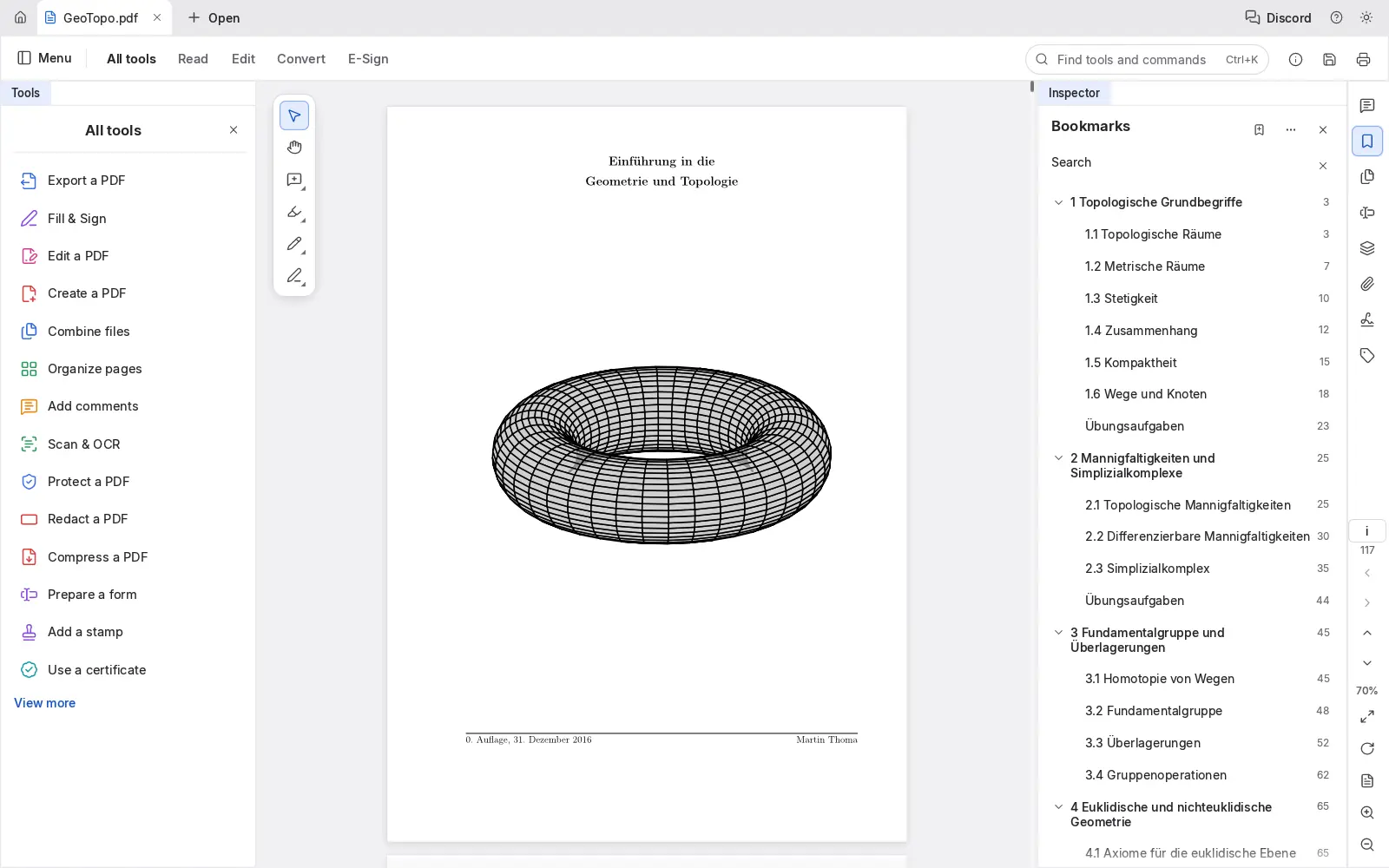
PdfCraft with a 117-page maths textbook open, the All tools list on the left and the bookmarks panel on the right
PdfCraft’s main window. Document: GeoTopo by Martin Thoma (CC BY-SA 4.0). Screenshot: CraftSuite.

For compatibility we ran pdfcraft-cli check over all 35 sample files: 34 opened directly, and the last one is password-protected and opened once we gave it the password published with the samples. For comparison, MuPDF’s mutool info failed on one file with broken metadata that PdfCraft and Poppler both read.

Organizing pages

Organize Pages lays the document out as thumbnails. You can drag to reorder, rotate, delete, insert, replace and split, plus Bates numbering, cropping and page boxes. Changes show on the thumbnails immediately and are written with Save pages.
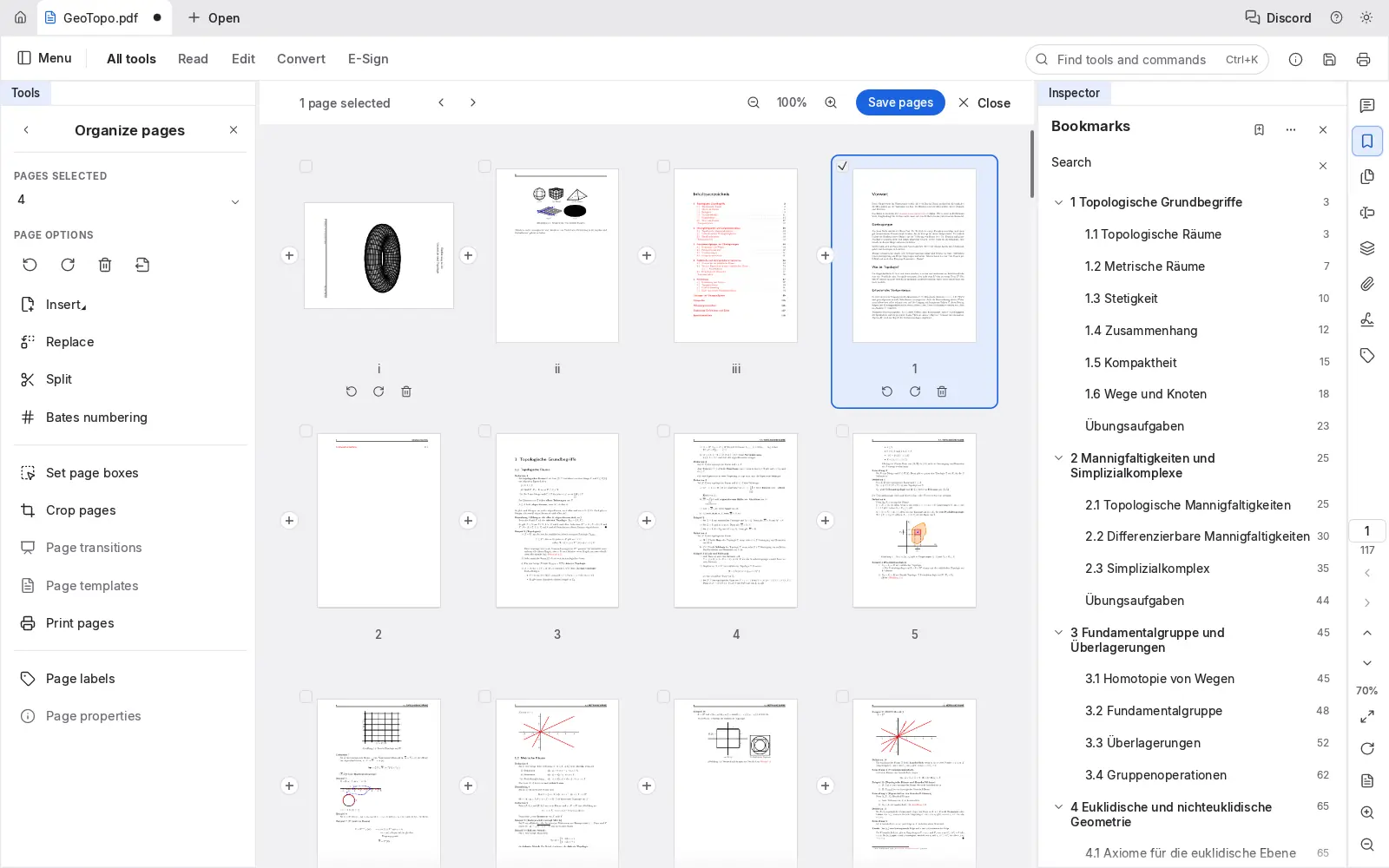
Recording: dragging page ii after page 1, then rotating the cover by 90°. Recording: CraftSuite.
PdfCraft Organize Pages view with the cover rotated and the former page ii moved to fourth place
The thumbnails after the changes. Screenshot: CraftSuite.

Filling forms and signing

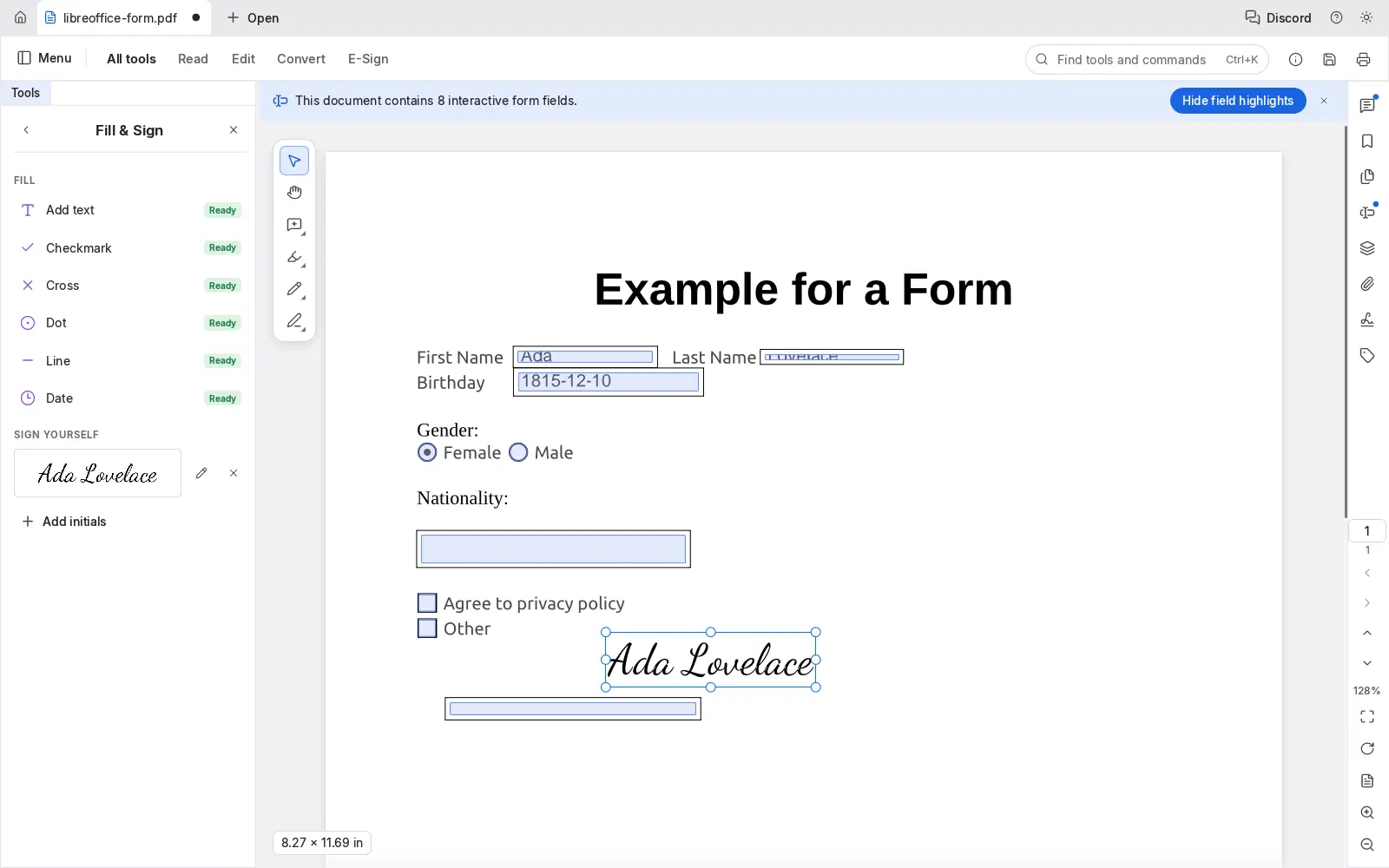
Opening a form exported from LibreOffice shows a banner, “This document contains 8 interactive form fields”, and Highlight fields marks them all. Text boxes, radio buttons and checkboxes fill in place. The Fill & Sign tool adds free text, ticks, crosses and dates anywhere, and creates a signature you can type, draw, import as an image or scan; it stays in the side panel for reuse.
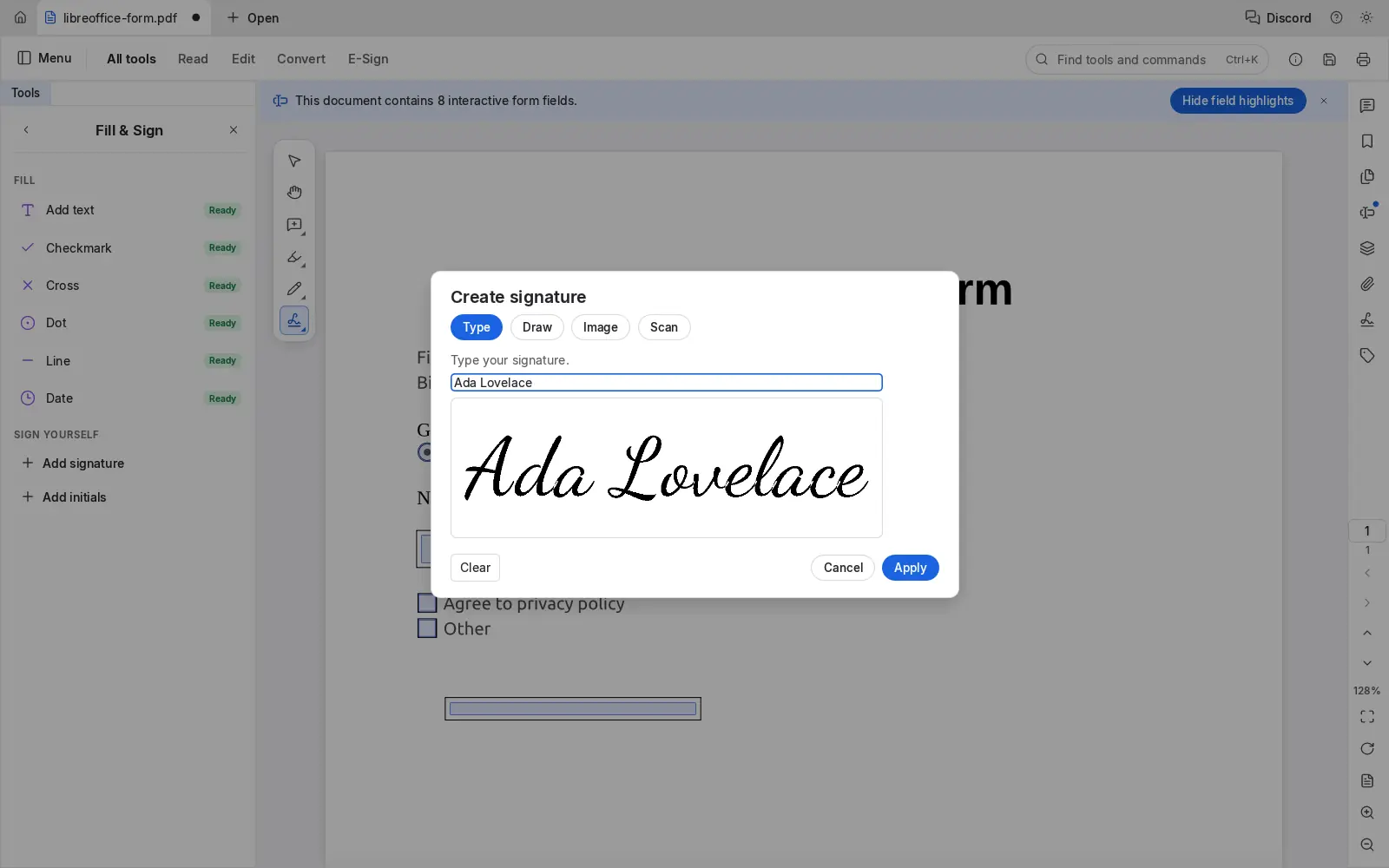
PdfCraft Create signature dialog showing Ada Lovelace in a handwriting font
Create signature: type, draw, image or scan. Screenshot: CraftSuite.
The filled form with first name, birthday and gender filled in and an Ada Lovelace signature placed below
The completed form with the signature placed. Form from the pypdf sample collection (CC BY-SA 4.0). Screenshot: CraftSuite.

Editing text in place

Edit a PDF → Edit text & images lets you click straight into the body text. We changed “ugly” to “boring” in a document exported from Google Docs and PdfCraft re-set the line in the original Helvetica, with controls for font, size, alignment, colour, line spacing and character spacing. The tool panel is upfront about what is done: finished tools say Ready, unfinished ones show their planned milestone (Attach file arrives in M12).
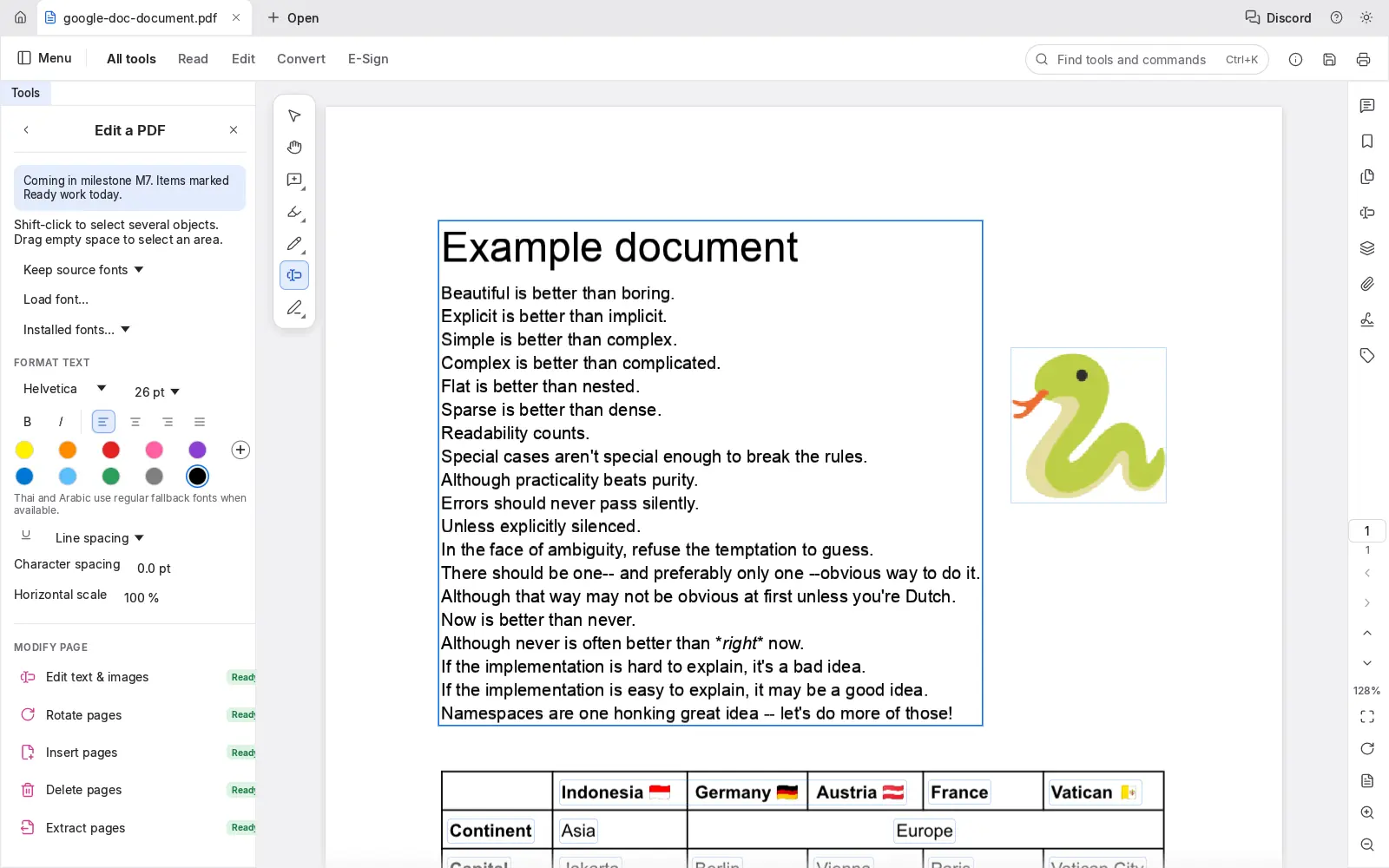
PdfCraft editing mode: the first line now reads Beautiful is better than boring, with font controls on the left
Editing body text; the font is kept. Document: pypdf sample collection (CC BY-SA 4.0). Screenshot: CraftSuite.

Careful: pressing Esc while editing discards the edit. We pressed Esc after the change and the text went back to “ugly”. Click outside the text box to commit.

Does redaction really remove the text?

A common mistake is “redacting” by drawing a black box over sensitive text. The text is still underneath and copy-paste reveals it. We made exactly such a file and asked PdfCraft to check it:

$ pdfcraft-cli audit faux-redacted.pdf
{"count":1,"findings":[{"covered_text":"Client account number: 4921-7783-1100-5520","kind":"covered-text","page":1,…}]}
pdfcraft-cli: audit: 1 faux redaction(s) found

It found the hidden account number. We then redacted the original with PdfCraft’s own tool (mark, apply, save) and extracted the text with Poppler’s pdftotext: the number is gone, and a byte search of the file finds it zero times. PdfCraft’s redaction really removes the content rather than covering it.

Offline OCR

We rendered two pages at 300 dpi, wrapped the images into “scanned” PDFs with no text at all, and ran PdfCraft’s batch OCR. Both files took 3.6 s together, fully offline: the recognition models ship inside the app, so there is no separate Tesseract install or model download.

English page (179 words)Words recognised in order
PdfCraft 0.9.0157 (87.7%)
Tesseract 5.3.4 (baseline)152 (84.9%)

Mistakes were mostly look-alike characters (“quess” for “guess”, “9ood” for “good”) and the reading order of a table. The page from the German maths textbook did much worse: formulas and diagrams were not recognised, only headings and plain text. This is a single page each, so treat it as a first impression.

Performance: PdfCraft vs MuPDF, Poppler, qpdf and Ghostscript

All run from the command line on the same machine while it was otherwise idle.

TaskPdfCraft 0.9.0Others
Render 117 pages to 150 dpi PNG (one process per page)10.5 sMuPDF 9.0 s · Poppler 34.1 s
Merge 10 copies (1,170 pages)1.7 s → 6.6 MBqpdf 0.4 s → 6.6 MB · MuPDF 0.5 s → 54.1 MB
Compress the 5.3 MB textbook0.8 s → 2.0 MB (−63%)Ghostscript /ebook 2.0 s → 1.5 MB (−72%) · qpdf 1.5 s → 5.3 MB
Compress a 2.3 MB single-image PDF0.1 s → 1.8 MB (−21%)Ghostscript 0.1 s → 0.05 MB
Open the 117-page document (desktop app)0.18 s · 223 MB RAM—

Reading the numbers: rendering is in MuPDF’s league and more than three times faster than Poppler. When merging, PdfCraft de-duplicates shared fonts and images (its output is as small as qpdf’s) while MuPDF copied everything ten times. PdfCraft compresses more conservatively than Ghostscript: Ghostscript re-encoded the lossless image in the single-image PDF as JPEG, losing quality, while PdfCraft kept the original. All 30,168 words of the compressed textbook could still be extracted.

For render quality, taking MuPDF as the reference, PdfCraft’s 117 pages differed by 2.9% on average and Poppler’s by 6.0%, mostly anti-aliasing. The next problem is not anti-aliasing:
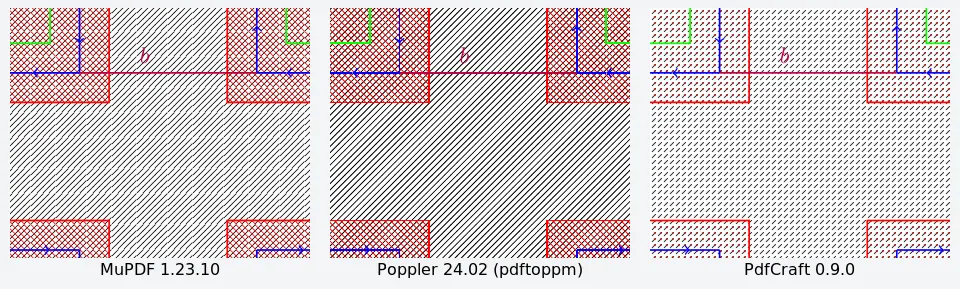
The same hatched area rendered three ways: continuous diagonal lines in MuPDF and Poppler, broken dashes in PdfCraft
A pattern fill on page 55 of the textbook PDF (printed page 52): MuPDF and Poppler draw continuous hatching, PdfCraft 0.9.0 draws broken dashes. Document: GeoTopo (CC BY-SA 4.0).

Problems we hit

  1. Pattern fills (hatching, cross-hatching) render wrongly. They are common in technical drawings and maths figures; compare with another viewer before printing or exporting.
  2. Esc discards a text edit. Click outside the text box to commit it.
  3. Some tools aren’t finished. Tools labelled with a milestone (M7, M11, M12; for example Attach file and Audit space usage) can’t be used yet; go by the Ready labels.
  4. OCR won’t read formulas. Body text is fine; keep the original images of equations and complex figures.
  5. Good news: a crash doesn’t lose your work. We force-quit PdfCraft in the middle of filling a form; on the next start it offered to recover the unsaved document, with every field intact.
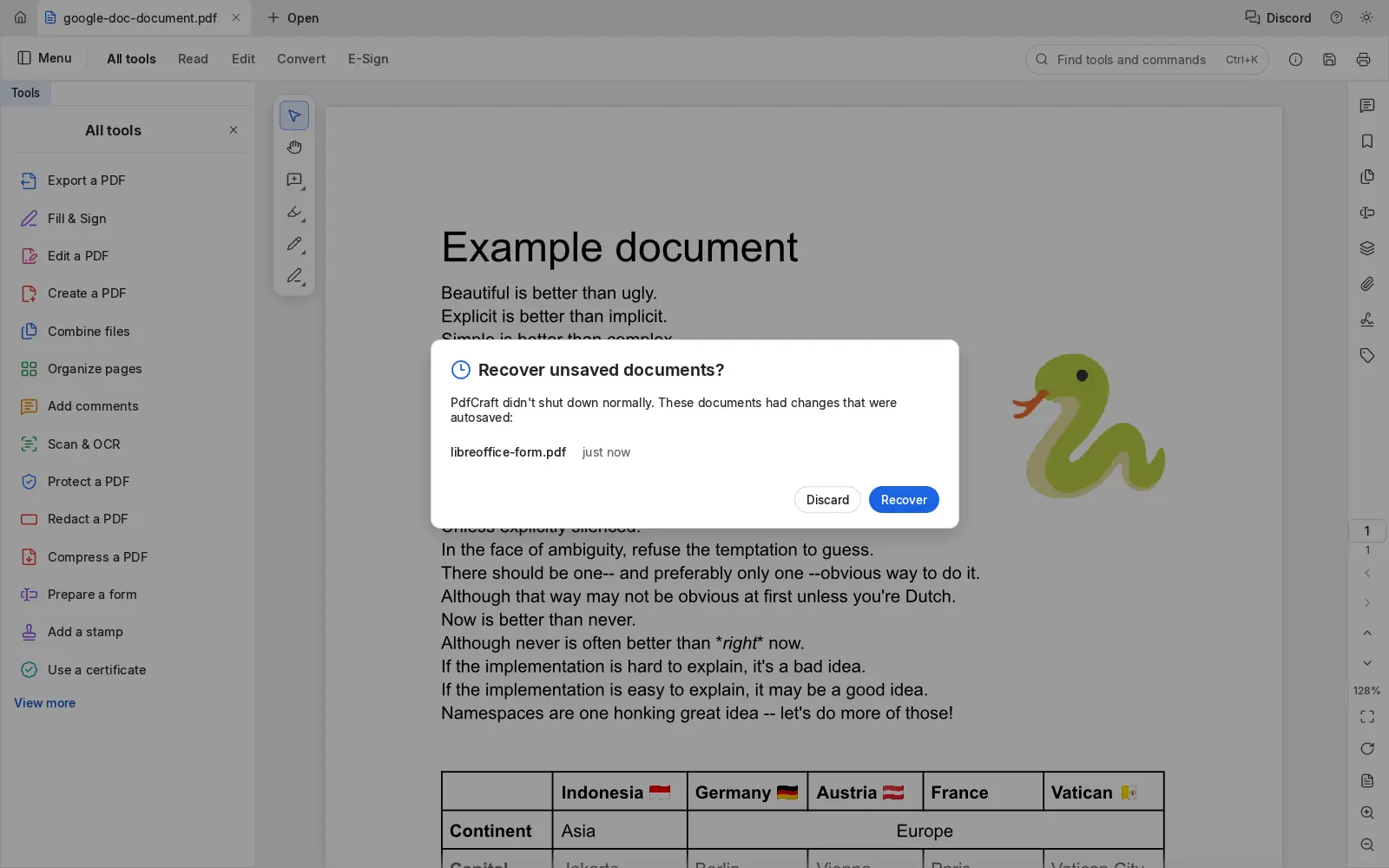
PdfCraft on restart offering to recover the unsaved document libreoffice-form.pdf
After a forced quit, PdfCraft offers to recover the autosaved form. Screenshot: CraftSuite.

Who should use it

  • Good fit: anyone paying for Acrobat just to fill forms, sign, merge and split, fix a few words, redact or compress; people who handle PDFs on Linux; anyone who wants scripts or an AI assistant to batch-process PDFs (PdfCraft ships a CLI and an MCP server).
  • Not yet: professional workflows that rely on preflight, PDF/A validation or exact output of complex patterns and technical drawings.

Need help installing? See the Windows, macOS and Linux guides, or read how to turn a DOCX into a PDF with WordCraft.

PdfCraft vs Adobe Acrobat

Can PdfCraft replace Acrobat? The key differences at a glance.

PdfCraftAdobe Acrobat
PriceFreePaid subscription (Creative Cloud)
LicenseOpen source (Apache-2.0)Proprietary
PlatformsWindows, macOS, Linux, FreeBSD, WebWindows, macOS
FilesPDF (read, annotate, forms, organize, combine, split, redact, sign)Native Acrobat formats
Account / cloudNo account, works offline, no telemetryAdobe account required
AI agent controlBuilt-in CLI and MCP server—
MaturityEarly alpha. About half of Acrobat Pro’s offline features (88% of the must-haves), according to the project.Industry standard, mature

Free Adobe Acrobat alternatives

  • Stirling-PDF Open source Self-hosted · Desktop
    Open-source toolbox for merging, splitting, converting and signing PDFs.
  • PDFsam Basic Open source Win · Mac · Linux
    Split, merge, rotate and mix PDF pages.
  • Okular Open source Win · Mac · Linux
    Fast document viewer with annotations and form filling.

Compare all Adobe alternatives →

All PdfCraft downloads · v0.22.0

Every file links directly to the official GitHub Releases — nothing is re-hosted here. Third-party mirror sites are often several versions behind and can’t guarantee the files are untouched.

Windows Installation help →

FormatArchitectureSize
Portable (.zip)
pdfcraft-0.22.0-windows-arm64-portable.zip
ARM64 122 MB
Installer (.msi)
pdfcraft-0.22.0-windows-arm64.msi
ARM64 97.4 MB
Portable (.zip)
pdfcraft-0.22.0-windows-x64-portable.zip
x64 / x86_64 127 MB
Installer (.msi)
pdfcraft-0.22.0-windows-x64.msi
x64 / x86_64 103 MB

macOS Installation help →

FormatArchitectureSize
Disk image (.dmg)
pdfcraft-0.22.0-macos-universal.dmg
Universal (Apple silicon + Intel) 139 MB
CLI · Archive (.zip)
pdfcraft-cli-0.22.0-macos-universal.zip
Universal (Apple silicon + Intel) 97.3 MB

Linux Installation help →

FormatArchitectureSize
AppImage
pdfcraft-0.22.0-linux-aarch64.AppImage
ARM64 114 MB
Debian / Ubuntu (.deb)
pdfcraft-0.22.0-linux-aarch64.deb
ARM64 123 MB
Flatpak
pdfcraft-0.22.0-linux-aarch64.flatpak
ARM64 86.3 MB
Tarball (.tar.gz)
pdfcraft-0.22.0-linux-aarch64.pkg.tar.zst
ARM64 92.8 MB
Fedora / openSUSE (.rpm)
pdfcraft-0.22.0-linux-aarch64.rpm
ARM64 122 MB
Tarball (.tar.gz)
pdfcraft-0.22.0-linux-aarch64.tar.gz
ARM64 120 MB
Debian / Ubuntu (.deb)
pdfcraft-0.22.0-linux-riscv64.deb
— 123 MB
Fedora / openSUSE (.rpm)
pdfcraft-0.22.0-linux-riscv64.rpm
— 123 MB
Tarball (.tar.gz)
pdfcraft-0.22.0-linux-riscv64.tar.gz
— 122 MB
AppImage
pdfcraft-0.22.0-linux-x86_64.AppImage
x64 / x86_64 118 MB
Debian / Ubuntu (.deb)
pdfcraft-0.22.0-linux-x86_64.deb
x64 / x86_64 127 MB
Flatpak
pdfcraft-0.22.0-linux-x86_64.flatpak
x64 / x86_64 91.9 MB
Tarball (.tar.gz)
pdfcraft-0.22.0-linux-x86_64.pkg.tar.zst
x64 / x86_64 95.9 MB
Fedora / openSUSE (.rpm)
pdfcraft-0.22.0-linux-x86_64.rpm
x64 / x86_64 126 MB
Tarball (.tar.gz)
pdfcraft-0.22.0-linux-x86_64.tar.gz
x64 / x86_64 125 MB
CLI · Tarball (.tar.gz)
pdfcraft-cli-0.22.0-linux-aarch64.tar.gz
ARM64 46.3 MB
CLI · Tarball (.tar.gz)
pdfcraft-cli-0.22.0-linux-x86_64.tar.gz
x64 / x86_64 48.3 MB

FreeBSD

FormatArchitectureSize
Tarball (.tar.gz)
pdfcraft-0.22.0-freebsd-aarch64.tar.gz
ARM64 119 MB
Tarball (.tar.gz)
pdfcraft-0.22.0-freebsd-x86_64.tar.gz
x64 / x86_64 125 MB

Web (WebAssembly)

FormatArchitectureSize
Archive (.zip)
pdfcraft-web-0.22.0.zip
— 35.6 MB

SHA-256 checksums · All files on GitHub ↗ · All releases ↗

How to install PdfCraft

Windows

Download the .msi and double-click it. If SmartScreen appears, click “More info → Run anyway”. A portable .zip is also available.

Installation help →

macOS

Open the .dmg and drag PdfCraft to Applications. The universal build runs on Apple silicon and Intel. Seeing “cannot verify the developer”? See the fix.

Installation help →

Linux

AppImage: chmod +x and run. .deb, .rpm, Flatpak and tarballs are also provided; glibc 2.35+ is required.

Installation help →

What's new: PdfCraft v0.22.0

v0.22.0 · Released Nov 23, 2026

What's Changed

…

Full release notes on GitHub ↗

Full PdfCraft changelog →

PdfCraft FAQ

Early alpha. About half of Acrobat Pro’s offline features (88% of the must-haves), according to the project.

Is it called PdfCraft or PrintCraft?

The official name is PdfCraft (repository: github.com/storytold/pdfcraft). “PrintCraft” is a mistake that appeared in some early articles.

Does PdfCraft upload my documents?

No. Documents never leave your machine: there is no account, no telemetry and no cloud processing.

Are the ArtCraft apps free?

Yes. All 13 Crafting Apps and the ArtCraft Launcher are open source under a dual MIT OR Apache-2.0 licence — free to download and use, with no account required. The paid plans on getartcraft.com are for ArtCraft’s separate AI image and video studio; the Crafting Apps don’t need a subscription.

Are the downloads safe?

Yes, as long as you download from the official GitHub repositories at github.com/storytold. Every download button on this site links directly to the official GitHub Releases — nothing is re-hosted. Windows installers are code-signed, macOS builds are signed and notarized, and each release ships a SHA256SUMS.txt file. Beware of look-alike “downloader” or “installer” repositories on GitHub. More on safety.

Are they affiliated with Adobe or Microsoft?

No. The apps are clean-room reimplementations of Adobe, Microsoft Office, AutoCAD, Pro Tools and Figma workflows built by the ArtCraft team, and are not affiliated with or endorsed by any of those companies. This site (CraftSuite) is also an independent, unofficial guide. See the Adobe alternatives and Office alternatives tables for every option.

Your download has started

Install

Star on GitHub Join the Discord

While it downloads — two more tools from our team Sponsored

AiLoft · All-in-one AI image & video studioFree credits on sign-up · one-time packs that never expire, save up to 20% PixelSniff · Is this image AI-generated? Find out in seconds5 free checks a day, no sign-up · free credits for deep reports

Download didn’t start? Try again