
EffectCraft Download — Free, Open-Source After Effects Alternative
EffectCraft is a free, open-source compositor in the spirit of Adobe After Effects, written in pure Rust: compositions, layers, keyframes, 306 effects, layer styles, JavaScript expressions, 3D cameras and lights, and a render queue — plus Lottie import and export.
- 9,198 stars
- Latest: v0.25.1
- Released Nov 23, 2026
- License: Apache-2.0
- Alpha
- Ready for real work: ~45%
- Checked against GitHub 14 min ago
brew install --cask effectcraft These are desktop apps. Send yourself the link and download on your Windows, Mac or Linux computer.
Unofficial guide — not affiliated with ArtCraft, Adobe, Microsoft or any other vendor. All downloads link to the official GitHub Releases.
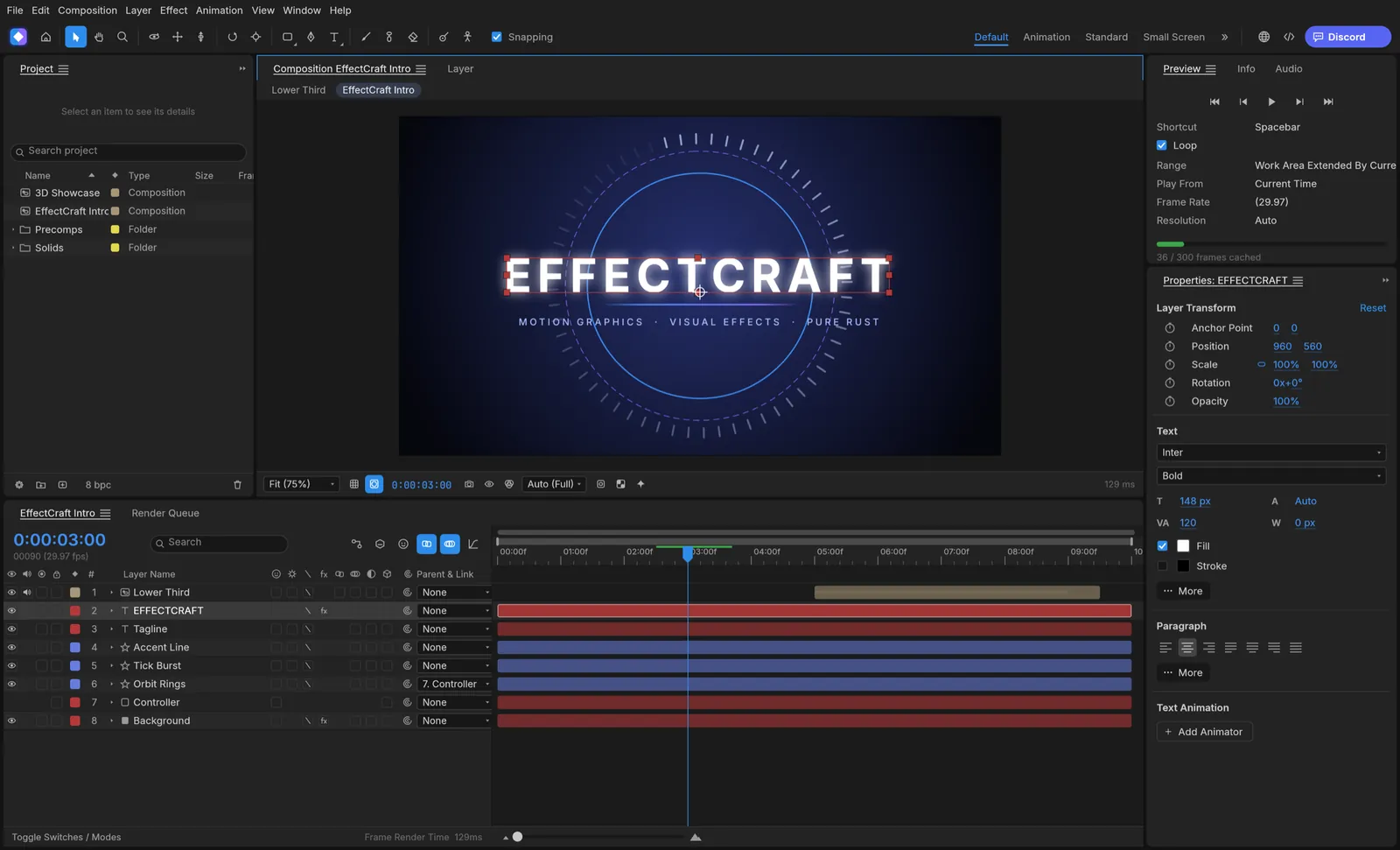
EffectCraft features
Compositions & layers
Solids, shapes, text, footage, nested comps, nulls, cameras and lights, with After Effects-style timeline shortcuts.
306 effects
Blurs, keys, distortions, simulation (Particle World, Shatter, Caustics…), audio, text and utility effects.
Expressions
JavaScript expressions with the After Effects object model — wiggle, loopOut and friends.
Lottie built in
Import and export Lottie JSON so animations go straight to the web and apps.
Puppet & masks
Puppet pins, shape layers with trim paths and repeaters, masks and time remapping.
No FFmpeg
Pure-Rust encoding to ProRes (up to 4444 XQ with alpha), HEVC, AV1 and VP9.
We installed EffectCraft: first-run notes
Tested EffectCraft 0.11.1 on Oct 20, 2026 · Ubuntu 24.04, 4 vCPU, 16 GB RAM, no GPU (software rendering) · How we test
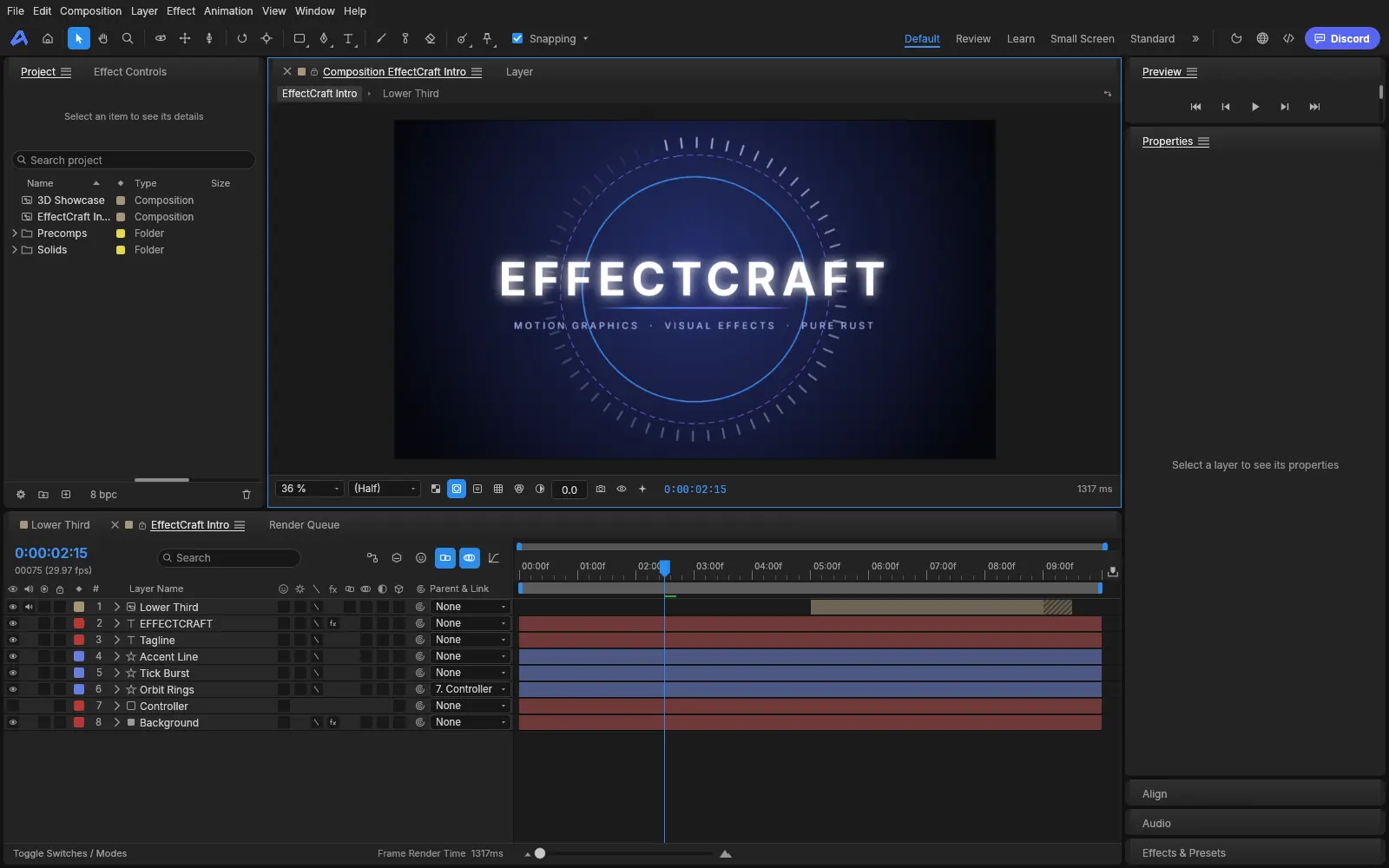
- The demo project has eight animated layers (text, shapes, a controller null) and opens straight into an After Effects-style composition.
- Without a GPU, one preview frame took about 1.3 seconds to render (status bar: 1317 ms). Smooth previews need real graphics hardware.
EffectCraft vs Adobe After Effects
Can EffectCraft replace After Effects? The key differences at a glance.
| EffectCraft | Adobe After Effects | |
|---|---|---|
| Price | Free | Paid subscription (Creative Cloud) |
| License | Open source (Apache-2.0) | Proprietary |
| Platforms | Windows, macOS, Linux, FreeBSD, Web | Windows, macOS |
| Files | Lottie JSON (import/export), ProRes MOV, HEVC, AV1, VP9; native .ecproj (JSON). Cannot open .aep/.aepx. | Native After Effects formats |
| Account / cloud | No account, works offline, no telemetry | Adobe account required |
| AI agent control | Built-in CLI and MCP server | — |
| Maturity | Young and moving fast. Cannot open After Effects projects (.aep) or run AE plug-ins; macOS is the most tested platform. | Industry standard, mature |
Free After Effects alternatives
All EffectCraft downloads · v0.25.1
Every file links directly to the official GitHub Releases — nothing is re-hosted here. Third-party mirror sites are often several versions behind and can’t guarantee the files are untouched.
Windows Installation help →
| Format | Architecture | Size |
|---|---|---|
| Portable (.zip) effectcraft-0.25.1-windows-arm64-portable.zip | ARM64 | 82.3 MB |
| Installer (.msi) effectcraft-0.25.1-windows-arm64.msi | ARM64 | 59.8 MB |
| Portable (.zip) effectcraft-0.25.1-windows-x64-portable.zip | x64 / x86_64 | 89.6 MB |
| Installer (.msi) effectcraft-0.25.1-windows-x64.msi | x64 / x86_64 | 67.2 MB |
macOS Installation help →
| Format | Architecture | Size |
|---|---|---|
| Disk image (.dmg) effectcraft-0.25.1-macos-universal.dmg | Universal (Apple silicon + Intel) | 86.3 MB |
| CLI · Archive (.zip) effectcraft-cli-0.25.1-macos-universal.zip | Universal (Apple silicon + Intel) | 81.3 MB |
Linux Installation help →
| Format | Architecture | Size |
|---|---|---|
| AppImage effectcraft-0.25.1-linux-aarch64.AppImage | ARM64 | 73.3 MB |
| Debian / Ubuntu (.deb) effectcraft-0.25.1-linux-aarch64.deb | ARM64 | 83.3 MB |
| Flatpak effectcraft-0.25.1-linux-aarch64.flatpak | ARM64 | 48.4 MB |
| Tarball (.tar.gz) effectcraft-0.25.1-linux-aarch64.pkg.tar.zst | ARM64 | 55.9 MB |
| Fedora / openSUSE (.rpm) effectcraft-0.25.1-linux-aarch64.rpm | ARM64 | 82.5 MB |
| Tarball (.tar.gz) effectcraft-0.25.1-linux-aarch64.tar.gz | ARM64 | 79.5 MB |
| Debian / Ubuntu (.deb) effectcraft-0.25.1-linux-riscv64.deb | — | 84.8 MB |
| Fedora / openSUSE (.rpm) effectcraft-0.25.1-linux-riscv64.rpm | — | 84.6 MB |
| Tarball (.tar.gz) effectcraft-0.25.1-linux-riscv64.tar.gz | — | 83.0 MB |
| AppImage effectcraft-0.25.1-linux-x86_64.AppImage | x64 / x86_64 | 78.9 MB |
| Debian / Ubuntu (.deb) effectcraft-0.25.1-linux-x86_64.deb | x64 / x86_64 | 87.6 MB |
| Flatpak effectcraft-0.25.1-linux-x86_64.flatpak | x64 / x86_64 | 55.1 MB |
| Tarball (.tar.gz) effectcraft-0.25.1-linux-x86_64.pkg.tar.zst | x64 / x86_64 | 59.6 MB |
| Fedora / openSUSE (.rpm) effectcraft-0.25.1-linux-x86_64.rpm | x64 / x86_64 | 87.0 MB |
| Tarball (.tar.gz) effectcraft-0.25.1-linux-x86_64.tar.gz | x64 / x86_64 | 85.6 MB |
FreeBSD
| Format | Architecture | Size |
|---|---|---|
| Tarball (.tar.gz) effectcraft-0.25.1-freebsd-aarch64.tar.gz | ARM64 | 82.5 MB |
| Tarball (.tar.gz) effectcraft-0.25.1-freebsd-x86_64.tar.gz | x64 / x86_64 | 84.9 MB |
Web (WebAssembly)
| Format | Architecture | Size |
|---|---|---|
| Archive (.zip) effectcraft-web-0.25.1.zip | — | 23.7 MB |
How to install EffectCraft
Windows
Download the .msi and double-click it. If SmartScreen appears, click “More info → Run anyway”. A portable .zip is also available.
macOS
Open the .dmg and drag EffectCraft to Applications. The universal build runs on Apple silicon and Intel. Seeing “cannot verify the developer”? See the fix.
Linux
AppImage: chmod +x and run. .deb, .rpm, Flatpak and tarballs are also provided; glibc 2.35+ is required.
What's new: EffectCraft v0.25.1
v0.25.1 · Released Nov 23, 2026
Highlights
- After Effects compatibility: .aep import is twice as fast and handles huge or hostile files without stalling, keeps effects it can't map as placeholders, and imports text animator Stroke Opacity and Source Text expressions. Dozens of effect parameters now take After Effects' ranges, and Ball Grid gets every CC Ball Action control.
- Media: video and audio decoding moved to the shared Craft media libraries, with many import fixes (ProRes alpha, MOV timecode and audio edits, Matroska aspect and duration, MXF, AVI and FLAC).
- Caching rebuilt: footage is decoded once, all caches share one memory budget, and idle caching is on. Closing a project frees its memory.
- Editing: the Graph Editor follows the theme and draws curves through every keyframe, number fields accept arithmetic (960/2), Effect Controls can be locked to a layer, the Composition viewer has a 1 | 2 | 4 views switch, and reversed layers play their audio backwards.
- Fixes: file dialogs that can't open are errors instead of crashes, Warp Stabilizer and 3D Camera Tracker analyses survive offline footage and older projects, and LUT and OCIO files are re-read when they change on disk.
What's Changed
- Export, Media: codecs and containers from craft-libs; remove hevcenc, av1enc, vp9enc by @dylanmtaylor in https://github.com/storytold/effectcraft/pull/3522
- #2796: ScriptUI panel bars hide while the window fits its dock by @arnav-hiwarkar in https://github.com/storytold/effectcraft/pull/2880
- Warp Stabilizer, 3D Camera Tracker: keep analyses saved before 0.23 (#3456) by @arnav-hiwarkar in https://github.com/storytold/effectcraft/pull/3530
- Apply Color LUT and Lumetri follow a LUT file that changes on disk (#3493) by @arnav-hiwarkar in https://github.com/storytold/effectcraft/pull/3533
- .aep import: an item made from one Photoshop layer shows that layer (#3087) by @arnav-hiwarkar in https://github.com/storytold/effectcraft/pull/3449
- Expressions, Scripting: a layer's property numbers and match names follow After Effects (#3528) by @GenuineMoron in https://github.com/storytold/effectcraft/pull/3529
- .aep import: keep effects without a counterpart as placeholders (#3087) by @arnav-hiwarkar in https://github.com/storytold/effectcraft/pull/3450
- Warp Stabilizer, 3D Camera Tracker, Roto Brush: one explicit analysis key; offline footage keeps analyses (#3534, #3536) by @arnav-hiwarkar in https://github.com/storytold/effectcraft/pull/3550
- Import: a 3D model's left-out textures reach the user as an import warning by @dylanmtaylor in https://github.com/storytold/effectcraft/pull/3523
- Text layout: a wrapped line finds its glyphs and end caret by bisection by @dylanmtaylor in https://github.com/storytold/effectcraft/pull/3506
- Timewarp: bound the motion search's total work by coarsening the vector grid by @dylanmtaylor in https://github.com/storytold/effectcraft/pull/3505
- Export: Skip Existing keeps a frame already in the overflow folder by @dylanmtaylor in https://github.com/storytold/effectcraft/pull/3500
- Convert Expression to Keyframes: refuse layers of more than 2^18 frames by @dylanmtaylor in https://github.com/storytold/effectcraft/pull/2999
- Media: check still, EXR channel, GIF and WebP canvas sizes before allocating by @dylanmtaylor in https://github.com/storytold/effectcraft/pull/2993
- Render: memoized audio detection, bounded stretch, preroll, waveform, cache entries, 3D bounds, solids and selector time by @dylanmtaylor in https://github.com/storytold/effectcraft/pull/2988
- Automation: refuse Watch Folder and Edit Original while file access is confined by @dylanmtaylor in https://github.com/storytold/effectcraft/pull/2983
- FBX: records stay within their parent; textures, materials and links are indexed by @dylanmtaylor in https://github.com/storytold/effectcraft/pull/2955
- Viewers show footage reloaded with unchanged metadata (#3539) by @arnav-hiwarkar in https://github.com/storytold/effectcraft/pull/3561
- OCIO File Transform and custom OCIO configs follow their files on disk (#3538) by @arnav-hiwarkar in https://github.com/storytold/effectcraft/pull/3560
- Warp Stabilizer, 3D Camera Tracker: analysis keys cover masks, effects above and precomp contents (#3535) by @arnav-hiwarkar in https://github.com/storytold/effectcraft/pull/3564
- Effects: 18 parameters take After Effects' valid ranges (Levels IC, 4-Color Gradient, Change Color, Noise HLS, Grid, Venetian Blinds, Radial Wipe, Scatter, Beam, Transform, Turbulent Displace) by @arnav-hiwarkar in https://github.com/storytold/effectcraft/pull/3571
- 3D models: bound and share decoded textures, share skin matrices, index OBJ materials by @dylanmtaylor in https://github.com/storytold/effectcraft/pull/2965
- Fix opening and closing manually drawn paths by @arnav-hiwarkar in https://github.com/storytold/effectcraft/pull/2876
- Fix Effect Controls arrow-key collapse and expand (#2869) by @arnav-hiwarkar in https://github.com/storytold/effectcraft/pull/2875
- SVG: support static pattern fills and strokes by @slager2 in https://github.com/storytold/effectcraft/pull/2732
- .aep import: a test pins the Orientation expression import (#3087) by @vangel76 in https://github.com/storytold/effectcraft/pull/3313
- .aep import/export: text animator Stroke Opacity and Source Text expressions (#3170) by @vangel76 in https://github.com/storytold/effectcraft/pull/3305
- .aep: import twice as fast, faster export by @vangel76 in https://github.com/storytold/effectcraft/pull/3302
- test: resolve xtask from relocated nextest archives by @skylartaylor in https://github.com/storytold/effectcraft/pull/3322
- ci: limit concurrent GPU tests in nextest by @skylartaylor in https://github.com/storytold/effectcraft/pull/3323
- Scripting: ParagraphJustification has After Effects' numbers (#3608) by @GenuineMoron in https://github.com/storytold/effectcraft/pull/3610
…
EffectCraft FAQ
Can EffectCraft open After Effects .aep projects?
Can EffectCraft export Lottie animations?
Are the ArtCraft apps free?
Are the downloads safe?
Are they affiliated with Adobe or Microsoft?
Sponsored
Two more tools from the CraftSuite team
Generate backgrounds, textures and short clips to composite in your shots.
 AiLoftAll-in-one AI image & video studio
- GPT Image 2, Nano Banana Pro & video models in one place
- Up to 4K output, commercial use included
- No GPU, no install — runs in your browser
 PixelSniffIs this image AI-generated? Find out in seconds
- Several detection models combined into one clear score
- Deep analysis: highlighted AI areas, watermark & metadata checks, plain-language report
- Catches Midjourney, DALL·E, Stable Diffusion, Flux, Gemini and deepfakes
Other ArtCraft apps
 Mister Download ManagerIDM alternative
- PhotoCraftPhotoshop alternative
- VectorCraftIllustrator alternative
- FilmCraftPremiere Pro alternative
- LightCraftLightroom alternative
- PdfCraftAcrobat alternative
- DesignCraftInDesign alternative
- WordCraftWord alternative
- GridCraftExcel alternative
- DeckCraftPowerPoint alternative
- CADCraftAutoCAD alternative
- SoundCraftPro Tools alternative
- FigCraftFigma alternative
- ArtCraft LauncherInstall & update every app