
DesignCraft Download — Free, Open-Source InDesign Alternative
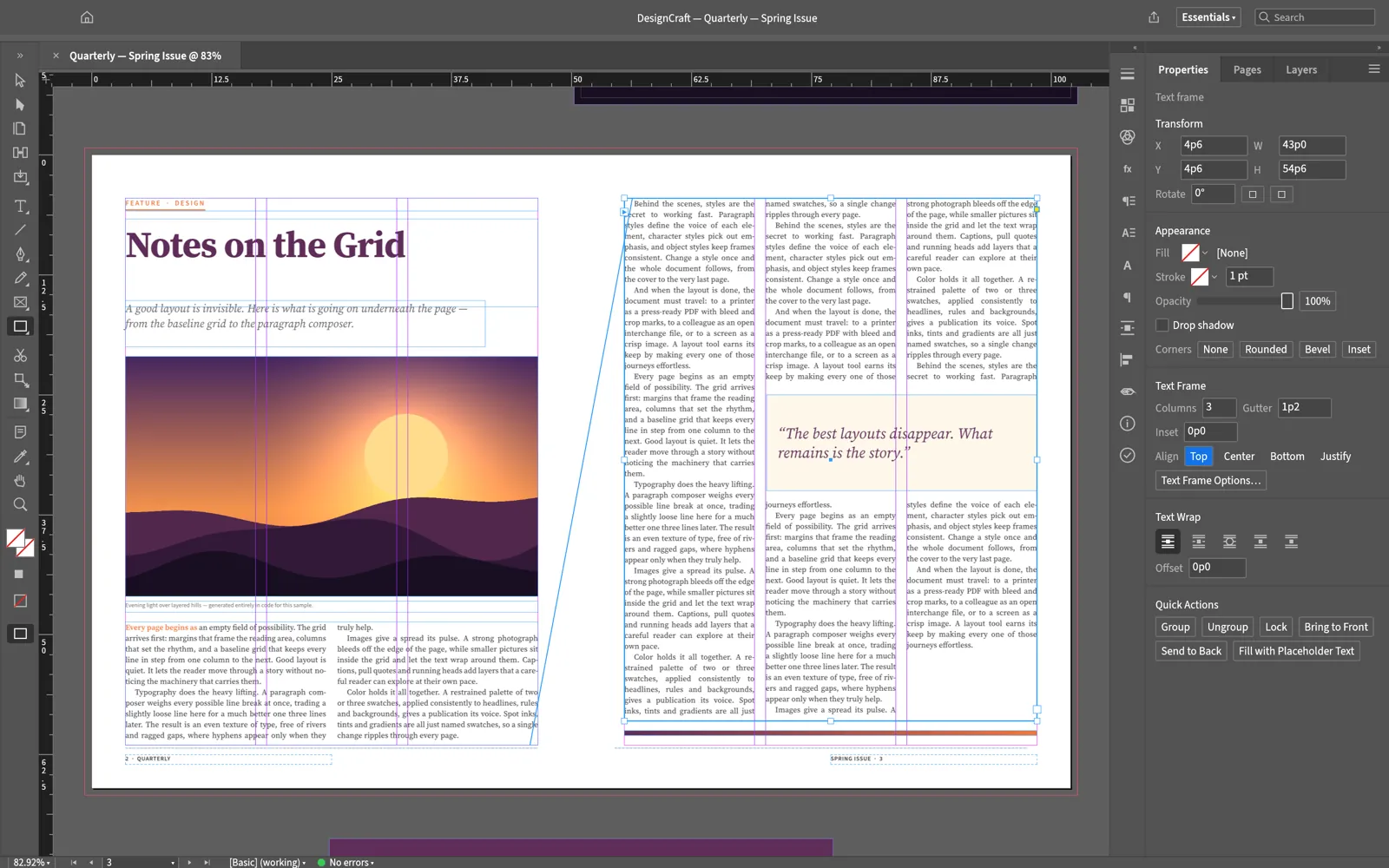
DesignCraft is a fast, open-source, clean-room take on the Adobe InDesign workflow in pure Rust: spreads and parent pages, threaded frames, a Knuth–Plass paragraph composer, IDML import/export and press-ready PDF/X-4 output.
- 5,393 stars
- Latest: v0.21.1
- Released Nov 23, 2026
- License: Apache-2.0
- Pre-alpha
- Ready for real work: ~47%
- Checked against GitHub 14 min ago
brew install --cask designcraft These are desktop apps. Send yourself the link and download on your Windows, Mac or Linux computer.
Unofficial guide — not affiliated with ArtCraft, Adobe, Microsoft or any other vendor. All downloads link to the official GitHub Releases.
DesignCraft features
Familiar layout tools
InDesign’s layout, tools, menus, panels and shortcuts: spreads, parent pages and threaded text frames.
Beautiful type
Knuth–Plass paragraph composer, dictionary hyphenation, and identical line breaks on screen and in PDF.
IDML in and out
Import and export InDesign’s IDML interchange format.
Print-ready PDF
Export PDF/X-4 and PDF/A-2b, plus PNG.
Fast
Multithreaded SIMD rendering and copy-on-write documents with O(1) undo.
No subscription
No licence server, no telemetry; agent-drivable over MCP.
We installed DesignCraft: first-run notes
Tested DesignCraft 0.9.0 on Oct 20, 2026 · Ubuntu 24.04, 4 vCPU, 16 GB RAM, no GPU (software rendering) · How we test
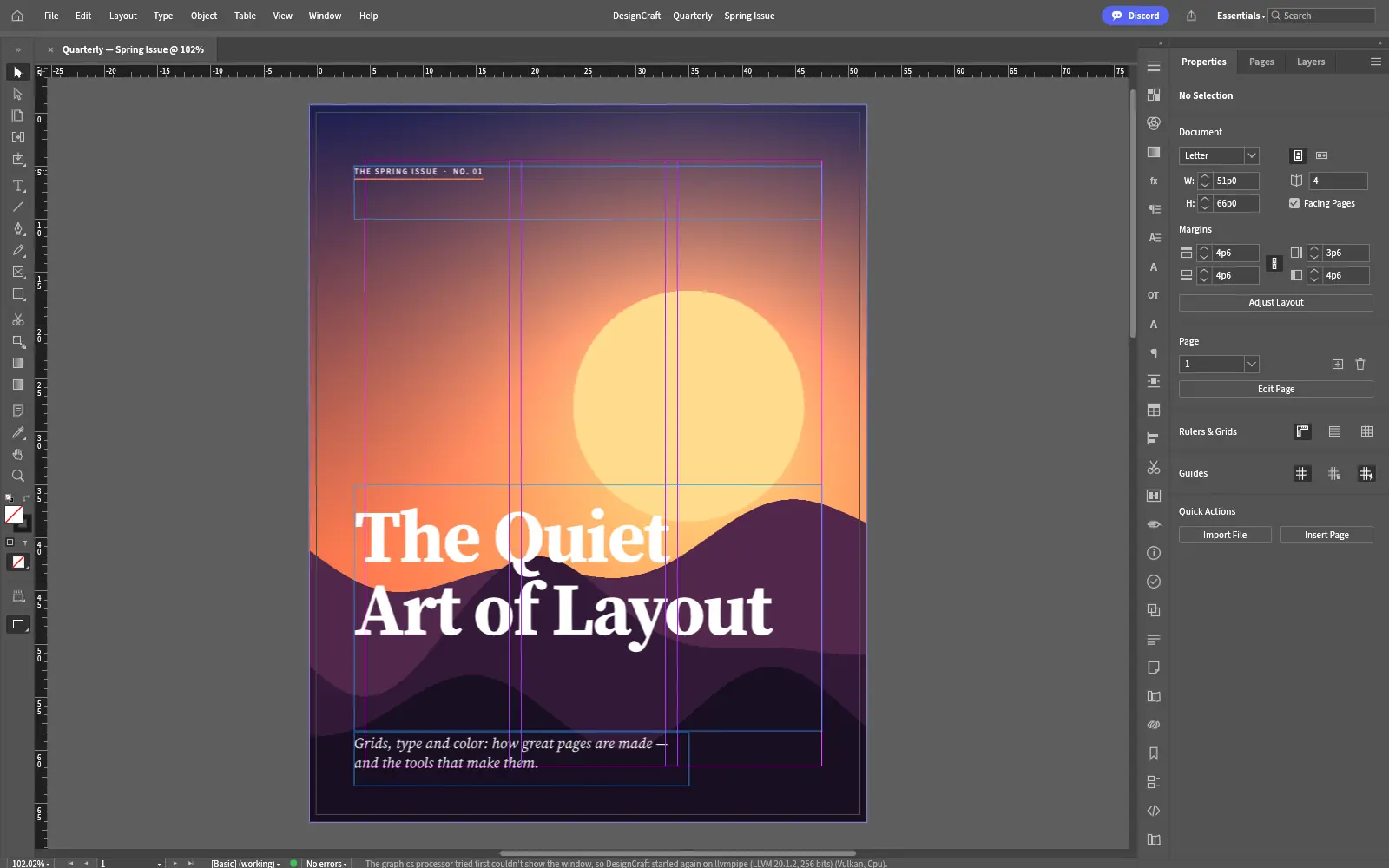
- The start screen offers print presets from Letter and A4 to business cards, plus a sample magazine to explore.
- On our machine the GPU path failed and DesignCraft restarted itself on software rendering automatically, saying so in the status bar instead of crashing.
DesignCraft vs Adobe InDesign
Can DesignCraft replace InDesign? The key differences at a glance.
| DesignCraft | Adobe InDesign | |
|---|---|---|
| Price | Free | Paid subscription (Creative Cloud) |
| License | Open source (Apache-2.0) | Proprietary |
| Platforms | Windows, macOS, Linux, FreeBSD, Web | Windows, macOS |
| Files | IDML (import/export), PDF/X-4, PDF/A-2b, PNG, native documented format | Native InDesign formats |
| Account / cloud | No account, works offline, no telemetry | Adobe account required |
| AI agent control | Built-in CLI and MCP server | — |
| Maturity | Early alpha. See the project’s ROADMAP for milestones before using it for print jobs. | Industry standard, mature |
Free InDesign alternatives
- Scribus Open source Win · Mac · Linux The long-standing open-source desktop publishing app, with CMYK and PDF/X.
- LibreOffice Draw Open source Win · Mac · Linux Fine for simple flyers and posters.
All DesignCraft downloads · v0.21.1
Every file links directly to the official GitHub Releases — nothing is re-hosted here. Third-party mirror sites are often several versions behind and can’t guarantee the files are untouched.
Windows Installation help →
| Format | Architecture | Size |
|---|---|---|
| Portable (.zip) designcraft-0.21.1-windows-arm64-portable.zip | ARM64 | 128 MB |
| Installer (.msi) designcraft-0.21.1-windows-arm64.msi | ARM64 | 98.1 MB |
| Portable (.zip) designcraft-0.21.1-windows-x64-portable.zip | x64 / x86_64 | 133 MB |
| Installer (.msi) designcraft-0.21.1-windows-x64.msi | x64 / x86_64 | 103 MB |
macOS Installation help →
| Format | Architecture | Size |
|---|---|---|
| Disk image (.dmg) designcraft-0.21.1-macos-universal.dmg | Universal (Apple silicon + Intel) | 264 MB |
| CLI · Archive (.zip) designcraft-cli-0.21.1-macos-universal.zip | Universal (Apple silicon + Intel) | 119 MB |
Linux Installation help →
| Format | Architecture | Size |
|---|---|---|
| AppImage designcraft-0.21.1-linux-aarch64.AppImage | ARM64 | 120 MB |
| Debian / Ubuntu (.deb) designcraft-0.21.1-linux-aarch64.deb | ARM64 | 130 MB |
| Flatpak designcraft-0.21.1-linux-aarch64.flatpak | ARM64 | 85.7 MB |
| Tarball (.tar.gz) designcraft-0.21.1-linux-aarch64.pkg.tar.zst | ARM64 | 94.4 MB |
| Fedora / openSUSE (.rpm) designcraft-0.21.1-linux-aarch64.rpm | ARM64 | 129 MB |
| Tarball (.tar.gz) designcraft-0.21.1-linux-aarch64.tar.gz | ARM64 | 127 MB |
| Debian / Ubuntu (.deb) designcraft-0.21.1-linux-riscv64.deb | — | 133 MB |
| Fedora / openSUSE (.rpm) designcraft-0.21.1-linux-riscv64.rpm | — | 133 MB |
| Tarball (.tar.gz) designcraft-0.21.1-linux-riscv64.tar.gz | — | 132 MB |
| AppImage designcraft-0.21.1-linux-x86_64.AppImage | x64 / x86_64 | 124 MB |
| Debian / Ubuntu (.deb) designcraft-0.21.1-linux-x86_64.deb | x64 / x86_64 | 134 MB |
| Flatpak designcraft-0.21.1-linux-x86_64.flatpak | x64 / x86_64 | 90.8 MB |
| Tarball (.tar.gz) designcraft-0.21.1-linux-x86_64.pkg.tar.zst | x64 / x86_64 | 97.5 MB |
| Fedora / openSUSE (.rpm) designcraft-0.21.1-linux-x86_64.rpm | x64 / x86_64 | 133 MB |
| Tarball (.tar.gz) designcraft-0.21.1-linux-x86_64.tar.gz | x64 / x86_64 | 132 MB |
FreeBSD
| Format | Architecture | Size |
|---|---|---|
| Tarball (.tar.gz) designcraft-0.21.1-freebsd-aarch64.tar.gz | ARM64 | 127 MB |
| Tarball (.tar.gz) designcraft-0.21.1-freebsd-x86_64.tar.gz | x64 / x86_64 | 132 MB |
Web (WebAssembly)
| Format | Architecture | Size |
|---|---|---|
| Archive (.zip) designcraft-web-0.21.1.zip | — | 30.7 MB |
How to install DesignCraft
Windows
Download the .msi and double-click it. If SmartScreen appears, click “More info → Run anyway”. A portable .zip is also available.
macOS
Open the .dmg and drag DesignCraft to Applications. The universal build runs on Apple silicon and Intel. Seeing “cannot verify the developer”? See the fix.
Linux
AppImage: chmod +x and run. .deb, .rpm, Flatpak and tarballs are also provided; glibc 2.35+ is required.
What's new: DesignCraft v0.21.1
v0.21.1 · Released Nov 23, 2026
Highlights
- Place: place several images at once with a loaded place cursor (with thumbnails and a count), drop images straight in, and make a contact sheet with File › Place Contact Sheet…. Images come in at the resolution stored in the file.
- Text and layout: Alpha Channel text wrap follows a transparent image's visible pixels, vertical justification is much more accurate in shaped and grid-aligned frames, and object styles can set paragraph styles and Text Frame General Options.
- Tables: diagonal lines in cells (Cell Options › Diagonal Lines) and Table › Go to Row….
- Faster editing: opening, preflight and recovery saves run in the background, and edits recompose only what changed, repaint only what moved and stop re-rendering every page thumbnail.
- Safer files: Save refuses to write a document that wouldn't reopen, PDF links allow only web and mail addresses, and many importers now refuse oversized or malformed input instead of exhausting memory.
- Fixes: Delete Unused Layers and Merge Layers keep grouped and anchored objects, cutting an object no longer pastes old text, whole-page PDF flattening respects non-printing layers, and pasting images from the system clipboard works.
What's Changed
- Render: clamp the blur size before the filter planner squares it by @dylanmtaylor in https://github.com/storytold/designcraft/pull/2640
- Type: type.align without a value is an error by @dotCooCoo in https://github.com/storytold/designcraft/pull/2645
- Tests: type.align refusal cases name the check that refuses each by @dotCooCoo in https://github.com/storytold/designcraft/pull/2662
- PPTX export: bound the retained glyph-to-character maps by @dylanmtaylor in https://github.com/storytold/designcraft/pull/2643
- xtask: refuse an oversized corpus archive before extracting it by @dylanmtaylor in https://github.com/storytold/designcraft/pull/2642
- Images: a WebP with an ICC chunk longer than the file is read without its profile by @dylanmtaylor in https://github.com/storytold/designcraft/pull/2638
- Data merge: a record range stops expanding once the limit is met by @dylanmtaylor in https://github.com/storytold/designcraft/pull/2636
- IDML: story export and object-style overlay in linear time, embedded image budget by @dylanmtaylor in https://github.com/storytold/designcraft/pull/2263
- Format: a failed entry read counts against the archive budget by @dylanmtaylor in https://github.com/storytold/designcraft/pull/2253
- Fonts: cap decoded names, bound outline flattening, cache fallback coverage by @dylanmtaylor in https://github.com/storytold/designcraft/pull/2252
- Engine: bounded DTD validation, compound-path hole orientation by @dylanmtaylor in https://github.com/storytold/designcraft/pull/2249
- Exports: leave out text the page doesn't show (inherited conditions, deletions, hidden layers) by @dylanmtaylor in https://github.com/storytold/designcraft/pull/2234
- Engine: index style, tag, swatch and run lookups; bound polygon sides, Change All and spelling candidates by @dylanmtaylor in https://github.com/storytold/designcraft/pull/2210
- Data Merge: a field in a table cell goes into the cell and is filled (#2315) by @Hamza0101 in https://github.com/storytold/designcraft/pull/2341
- Automation roots: refuse COM¹ to LPT³ and a device name before a colon by @adikshan11 in https://github.com/storytold/designcraft/pull/2383
- Save: a TIFF, BMP or PSD too big for opening to inflate is stored as is, so the document reopens by @jayzed80 in https://github.com/storytold/designcraft/pull/2701
- Compose: vertical Center, Bottom and Justify measure to the last baseline by @dotCooCoo in https://github.com/storytold/designcraft/pull/2648
- Preflight: check the document on a background worker, not on every edit by @dotCooCoo in https://github.com/storytold/designcraft/pull/2656
- Text: paragraph spacing and justification values are checked by @dotCooCoo in https://github.com/storytold/designcraft/pull/2650
- Justification: the dialog sets Auto Leading and Single Word Justification by @dotCooCoo in https://github.com/storytold/designcraft/pull/2659
- Fix MCP temporary directory build on Windows by @dotCooCoo in https://github.com/storytold/designcraft/pull/2355
- CMYK view: convert the blended inks to screen colours on the render threads by @dotCooCoo in https://github.com/storytold/designcraft/pull/2660
- Text Frame Options: a non-rectangular frame shows one Inset field by @dotCooCoo in https://github.com/storytold/designcraft/pull/2647
- Pages: an edit no longer renders every page thumbnail again by @dotCooCoo in https://github.com/storytold/designcraft/pull/2653
- Reject ambiguous table IDs across stories by @dotCooCoo in https://github.com/storytold/designcraft/pull/2354
- Anchored text frames: place a frame anchored inside another anchored frame by @dotCooCoo in https://github.com/storytold/designcraft/pull/2589
- Paste: images on the system clipboard paste as embedded images by @dotCooCoo in https://github.com/storytold/designcraft/pull/2665
- Copy: copied text gets text anchors and tables of its own by @dotCooCoo in https://github.com/storytold/designcraft/pull/1843
- Data merge: an image field in text places the image, not its path by @dotCooCoo in https://github.com/storytold/designcraft/pull/2649
- Render: keep drop shadow and outer glow images while an object moves by @dotCooCoo in https://github.com/storytold/designcraft/pull/2657
…
DesignCraft FAQ
Can DesignCraft open InDesign files?
Is DesignCraft good for print?
Are the ArtCraft apps free?
Are the downloads safe?
Are they affiliated with Adobe or Microsoft?
Sponsored
Two more tools from the CraftSuite team
Fill layouts with on-brand AI images instead of stock photos.
 AiLoftAll-in-one AI image & video studio
- GPT Image 2, Nano Banana Pro & video models in one place
- Up to 4K output, commercial use included
- No GPU, no install — runs in your browser
 PixelSniffIs this image AI-generated? Find out in seconds
- Several detection models combined into one clear score
- Deep analysis: highlighted AI areas, watermark & metadata checks, plain-language report
- Catches Midjourney, DALL·E, Stable Diffusion, Flux, Gemini and deepfakes
Other ArtCraft apps
 Mister Download ManagerIDM alternative
- PhotoCraftPhotoshop alternative
- VectorCraftIllustrator alternative
- FilmCraftPremiere Pro alternative
- LightCraftLightroom alternative
- PdfCraftAcrobat alternative
- EffectCraftAfter Effects alternative
- WordCraftWord alternative
- GridCraftExcel alternative
- DeckCraftPowerPoint alternative
- CADCraftAutoCAD alternative
- SoundCraftPro Tools alternative
- FigCraftFigma alternative
- ArtCraft LauncherInstall & update every app