
VectorCraft Download — Free, Open-Source Illustrator Alternative
VectorCraft is an open-source, clean-room take on the Adobe Illustrator workflow, written in pure Rust. It has Illustrator’s layout, tools and shortcuts — the Pen, Direct Selection, Pathfinder, Smart Guides, Appearance, Swatches and Layers — with first-class SVG and PDF support.
- 12,068 stars
- Latest: v0.24.1
- Released Nov 12, 2026
- License: Apache-2.0
- Alpha
- Ready for real work: ~62%
- Checked against GitHub 14 min ago
brew install --cask vectorcraft These are desktop apps. Send yourself the link and download on your Windows, Mac or Linux computer.
Unofficial guide — not affiliated with ArtCraft, Adobe, Microsoft or any other vendor. All downloads link to the official GitHub Releases.
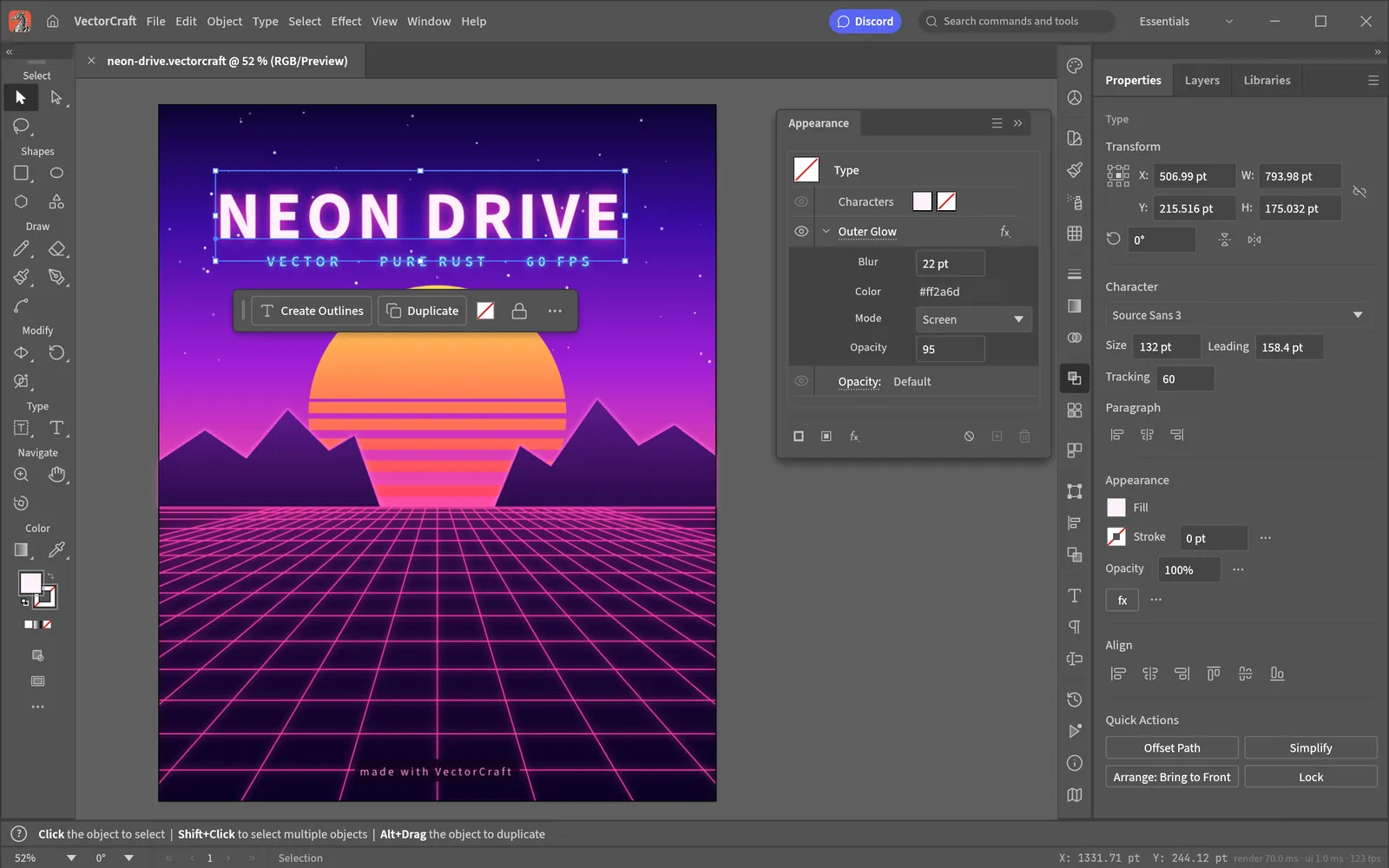
VectorCraft features
Familiar tools
Pen, Direct Selection, Pathfinder, Smart Guides, Appearance, Swatches and Layers, with Illustrator-style menus and shortcuts.
Exact boolean operations
Robust curve booleans — no “cannot perform operation” errors — plus unlimited undo.
Fast rendering
Multithreaded SIMD rendering off the UI thread; about 20,000 shapes render in roughly 27 ms.
Open formats
Native JSON format, first-class SVG/SVGZ, PDF and PDF-compatible .ai import/export, PNG/JPEG/WebP and Export for Screens.
Agent-native
Every menu item, tool gesture and dialog can be driven over a JSON control channel or an MCP server.
We installed VectorCraft: first-run notes
Tested VectorCraft 0.13.1 on Oct 20, 2026 · Ubuntu 24.04, 4 vCPU, 16 GB RAM, no GPU (software rendering) · How we test
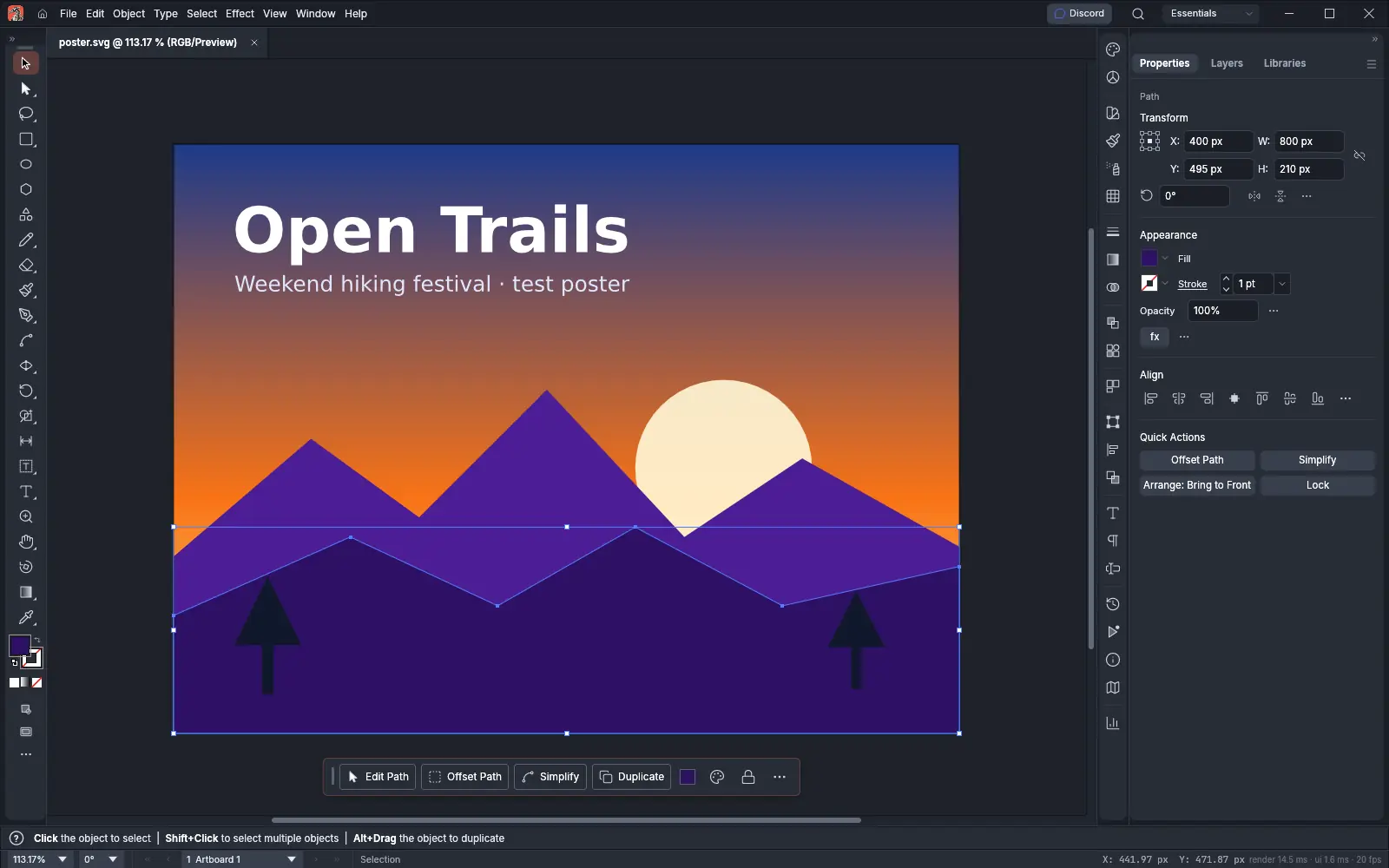
- The SVG’s linear gradient, paths and text came through intact, and selecting a path shows its transform, fill and stroke plus quick actions such as Offset Path and Simplify.
- It reported “DejaVu Sans” as a missing font although that font is installed on the system, and swapped in another face. Check the Missing Fonts dialog when you open files that use system fonts.
VectorCraft vs Adobe Illustrator
Can VectorCraft replace Illustrator? The key differences at a glance.
| VectorCraft | Adobe Illustrator | |
|---|---|---|
| Price | Free | Paid subscription (Creative Cloud) |
| License | Open source (Apache-2.0) | Proprietary |
| Platforms | Windows, macOS, Linux, FreeBSD, Web | Windows, macOS |
| Files | SVG / SVGZ, PDF, PDF-compatible .ai (import), PNG, JPEG, WebP | Native Illustrator formats |
| Account / cloud | No account, works offline, no telemetry | Adobe account required |
| AI agent control | Built-in CLI and MCP server | — |
| Maturity | Early alpha. The project estimates roughly 69–75% of Illustrator’s features exist and work (as of Oct 9, 2026). | Industry standard, mature |
Free Illustrator alternatives
All VectorCraft downloads · v0.24.1
Every file links directly to the official GitHub Releases — nothing is re-hosted here. Third-party mirror sites are often several versions behind and can’t guarantee the files are untouched.
Windows Installation help →
| Format | Architecture | Size |
|---|---|---|
| Portable (.zip) vectorcraft-0.24.1-windows-arm64-portable.zip | ARM64 | 147 MB |
| Installer (.msi) vectorcraft-0.24.1-windows-arm64.msi | ARM64 | 115 MB |
| Portable (.zip) vectorcraft-0.24.1-windows-x64-portable.zip | x64 / x86_64 | 155 MB |
| Installer (.msi) vectorcraft-0.24.1-windows-x64.msi | x64 / x86_64 | 124 MB |
macOS Installation help →
| Format | Architecture | Size |
|---|---|---|
| Disk image (.dmg) vectorcraft-0.24.1-macos-universal.dmg | Universal (Apple silicon + Intel) | 170 MB |
| CLI · Archive (.zip) vectorcraft-cli-0.24.1-macos-universal.zip | Universal (Apple silicon + Intel) | 128 MB |
Linux Installation help →
| Format | Architecture | Size |
|---|---|---|
| AppImage vectorcraft-0.24.1-linux-aarch64.AppImage | ARM64 | 135 MB |
| Debian / Ubuntu (.deb) vectorcraft-0.24.1-linux-aarch64.deb | ARM64 | 148 MB |
| Flatpak vectorcraft-0.24.1-linux-aarch64.flatpak | ARM64 | 97.1 MB |
| Tarball (.tar.gz) vectorcraft-0.24.1-linux-aarch64.pkg.tar.zst | ARM64 | 107 MB |
| Fedora / openSUSE (.rpm) vectorcraft-0.24.1-linux-aarch64.rpm | ARM64 | 146 MB |
| Tarball (.tar.gz) vectorcraft-0.24.1-linux-aarch64.tar.gz | ARM64 | 144 MB |
| Debian / Ubuntu (.deb) vectorcraft-0.24.1-linux-riscv64.deb | — | 150 MB |
| Fedora / openSUSE (.rpm) vectorcraft-0.24.1-linux-riscv64.rpm | — | 149 MB |
| Tarball (.tar.gz) vectorcraft-0.24.1-linux-riscv64.tar.gz | — | 148 MB |
| AppImage vectorcraft-0.24.1-linux-x86_64.AppImage | x64 / x86_64 | 141 MB |
| Debian / Ubuntu (.deb) vectorcraft-0.24.1-linux-x86_64.deb | x64 / x86_64 | 153 MB |
| Flatpak vectorcraft-0.24.1-linux-x86_64.flatpak | x64 / x86_64 | 105 MB |
| Tarball (.tar.gz) vectorcraft-0.24.1-linux-x86_64.pkg.tar.zst | x64 / x86_64 | 112 MB |
| Fedora / openSUSE (.rpm) vectorcraft-0.24.1-linux-x86_64.rpm | x64 / x86_64 | 152 MB |
| Tarball (.tar.gz) vectorcraft-0.24.1-linux-x86_64.tar.gz | x64 / x86_64 | 150 MB |
FreeBSD
| Format | Architecture | Size |
|---|---|---|
| Tarball (.tar.gz) vectorcraft-0.24.1-freebsd-aarch64.tar.gz | ARM64 | 142 MB |
| Tarball (.tar.gz) vectorcraft-0.24.1-freebsd-x86_64.tar.gz | x64 / x86_64 | 150 MB |
Web (WebAssembly)
| Format | Architecture | Size |
|---|---|---|
| Archive (.zip) vectorcraft-web-0.24.1.zip | — | 36.6 MB |
How to install VectorCraft
Windows
Download the .msi and double-click it. If SmartScreen appears, click “More info → Run anyway”. A portable .zip is also available.
macOS
Open the .dmg and drag VectorCraft to Applications. The universal build runs on Apple silicon and Intel. Seeing “cannot verify the developer”? See the fix.
Linux
AppImage: chmod +x and run. .deb, .rpm, Flatpak and tarballs are also provided; glibc 2.35+ is required.
What's new: VectorCraft v0.24.1
v0.24.1 · Released Nov 12, 2026
What's Changed
- EPS import: charge scanned strings, end failed filter decodes, bound data sources and JPEG/TIFF headers by @dylanmtaylor in https://github.com/storytold/vectorcraft/pull/6627
- i18n(ka): update the Georgian catalog (55 strings) by @devius in https://github.com/storytold/vectorcraft/pull/6630
- Guides: ruler guides are document objects on their layers by @dotCooCoo in https://github.com/storytold/vectorcraft/pull/6632
- Commands: every angle and rotation param says which way it turns (#6340) by @Hassan1305 in https://github.com/storytold/vectorcraft/pull/6631
- Scripts: File and Folder read files in the script's own folder by @dotCooCoo in https://github.com/storytold/vectorcraft/pull/6615
- JavaScript: new XML copies a one-item list's node, and insertChildAfter and insertChildBefore take fuel per child scanned by @dotCooCoo in https://github.com/storytold/vectorcraft/pull/6626
- G5: built-in Energy Beams brush library by @Messhias in https://github.com/storytold/vectorcraft/pull/6603
- Script checker: names follow Unicode ID_Start and ID_Continue by @dotCooCoo in https://github.com/storytold/vectorcraft/pull/6641
- Commands: ids null acts on the selection instead of being refused by @dotCooCoo in https://github.com/storytold/vectorcraft/pull/6640
- Tests: plug-in folder tests take turns on the folder last loaded by @dotCooCoo in https://github.com/storytold/vectorcraft/pull/6636
- Part of #6622: Help Bar hints and tool names show in full on hover when clipped by @dotCooCoo in https://github.com/storytold/vectorcraft/pull/6639
- PDF: an option writes pages longer than 200 in at full size in points by @dotCooCoo in https://github.com/storytold/vectorcraft/pull/6643
- Scripts: Math.random gets a new seed on every web page load by @dotCooCoo in https://github.com/storytold/vectorcraft/pull/6645
- Plug-ins: the fuzz test reads the runtime's fuel slice instead of a copy by @dotCooCoo in https://github.com/storytold/vectorcraft/pull/6646
- Type: Dynamic Text sizes type on a path to fill its brackets by @dotCooCoo in https://github.com/storytold/vectorcraft/pull/6648
- Scripts: an uncaught error that passes through a finally block is reported where it was thrown by @dotCooCoo in https://github.com/storytold/vectorcraft/pull/6653
- Scripts: test that the OS random value seeds Math.random by @dotCooCoo in https://github.com/storytold/vectorcraft/pull/6657
- Simplify: a closed subpath whose refits enclose no area keeps its outline by @dotCooCoo in https://github.com/storytold/vectorcraft/pull/6651
- ci: use StepSecurity's maintained actions by @dylanmtaylor in https://github.com/storytold/vectorcraft/pull/6658
- SVG import: references follow an id's first element, one read per linked file, bounded blank lines by @dylanmtaylor in https://github.com/storytold/vectorcraft/pull/5409
- CI: nightly release dry run by @FredApps in https://github.com/storytold/vectorcraft/pull/6678
- Graphs: graph.setType, setData and create refuse params of the wrong type by @dotCooCoo in https://github.com/storytold/vectorcraft/pull/6735
- Paragraph Styles: Style Options edits indents, spacing, composition, hyphenation and justification by @dotCooCoo in https://github.com/storytold/vectorcraft/pull/6734
- Symbols: the panel menu sorts by name and offers Small and Large List views by @dotCooCoo in https://github.com/storytold/vectorcraft/pull/6733
- Plug-ins: a failed rename back of a removed plug-in's settings is reported and undone later by @dotCooCoo in https://github.com/storytold/vectorcraft/pull/6732
- Edit: Paste in Place, in Front and in Back put a copy on each selected artboard by @dotCooCoo in https://github.com/storytold/vectorcraft/pull/6743
- Control bar: the panel menu turns each group of options on or off by @dotCooCoo in https://github.com/storytold/vectorcraft/pull/6737
- .ai/EPS import: gradient mesh corners in several inks take their tints last ink first by @dotCooCoo in https://github.com/storytold/vectorcraft/pull/6730
- Fix #6634: Pen closing drag no longer gives the first anchor symmetric handles by @dotCooCoo in https://github.com/storytold/vectorcraft/pull/6718
- Render: a long path is checked against the rasterizer's limits from its kept boxes by @dotCooCoo in https://github.com/storytold/vectorcraft/pull/6742
- Gradients: conic gradients sweep the stops once around the center by @dotCooCoo in https://github.com/storytold/vectorcraft/pull/6728
- Edit Colors: a switch or number of the wrong type is an error instead of the default by @dotCooCoo in https://github.com/storytold/vectorcraft/pull/6741
- Package, Place, Export: the Package, Place and export commands reject a param of the wrong type by @dotCooCoo in https://github.com/storytold/vectorcraft/pull/6727
- Type: Dynamic Text sets each line of area type to the frame width by @dotCooCoo in https://github.com/storytold/vectorcraft/pull/6682
- Tabs: indent drags on threaded frames set each story paragraph once, a split paragraph included by @dotCooCoo in https://github.com/storytold/vectorcraft/pull/6719
- Select: Object › Not Aligned to Pixel Grid selects paths without the pixel-aligned property by @dotCooCoo in https://github.com/storytold/vectorcraft/pull/6736
- Safe Mode: a plug-in found under several files is listed once in Help › Safe Mode by @dotCooCoo in https://github.com/storytold/vectorcraft/pull/6721
- Scripts: a missing file outside the script's folder is refused like an existing one by @dotCooCoo in https://github.com/storytold/vectorcraft/pull/6707
- Vector Halftone: a parameter of the wrong type is refused by @dotCooCoo in https://github.com/storytold/vectorcraft/pull/6715
…
VectorCraft FAQ
Can VectorCraft open .ai files?
Is VectorCraft better than Inkscape?
Are the ArtCraft apps free?
Are the downloads safe?
Are they affiliated with Adobe or Microsoft?
VectorCraft guides, comparisons & answers
Sponsored
Two more tools from the CraftSuite team
Generate reference art and concepts, then trace them into clean vectors.
 AiLoftAll-in-one AI image & video studio
- GPT Image 2, Nano Banana Pro & video models in one place
- Up to 4K output, commercial use included
- No GPU, no install — runs in your browser
 PixelSniffIs this image AI-generated? Find out in seconds
- Several detection models combined into one clear score
- Deep analysis: highlighted AI areas, watermark & metadata checks, plain-language report
- Catches Midjourney, DALL·E, Stable Diffusion, Flux, Gemini and deepfakes
Other ArtCraft apps
 Mister Download ManagerIDM alternative
- PhotoCraftPhotoshop alternative
- FilmCraftPremiere Pro alternative
- LightCraftLightroom alternative
- PdfCraftAcrobat alternative
- EffectCraftAfter Effects alternative
- DesignCraftInDesign alternative
- WordCraftWord alternative
- GridCraftExcel alternative
- DeckCraftPowerPoint alternative
- CADCraftAutoCAD alternative
- SoundCraftPro Tools alternative
- FigCraftFigma alternative
- ArtCraft LauncherInstall & update every app