

Mister Download Manager Download — Install & Update Every Craft App
Mister Download Manager is an independent GPL-3.0 download manager with a familiar IDM-style interface. It supports browser integration, accelerated downloads and BitTorrent, without ads, trials or sign-up.
- 5,097 stars
- Latest: v0.5.2
- Released Nov 9, 2026
- License: GPL-3.0
- Early alpha
- Checked against GitHub 8 min ago
These are desktop apps. Send yourself the link and download on your Windows, Mac or Linux computer.
Unofficial guide — not affiliated with ArtCraft, Adobe, Microsoft or any other vendor. All downloads link to the official GitHub Releases.
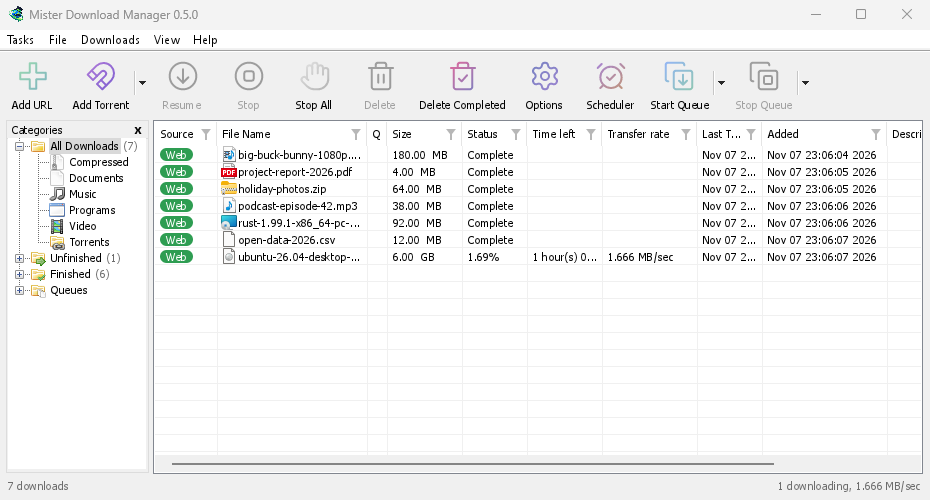
Mister Download Manager features
Browser integration
Extensions for Chromium browsers and Firefox connect downloads to the desktop app.
BitTorrent
Download magnet links and torrent files, with seeding support.
Desktop packages
Windows installers and portable builds, Linux packages and experimental macOS builds.
All Mister Download Manager downloads · v0.5.2
Every file links directly to the official GitHub Releases — nothing is re-hosted here. Third-party mirror sites are often several versions behind and can’t guarantee the files are untouched.
Windows Installation help →
| Format | Architecture | Size |
|---|---|---|
| Installer (.exe) MisterDownloadManager-0.5.2-setup.exe | — | 16.3 MB |
| Archive (.zip) MisterDownloadManager-0.5.2-symbols-windows-x64.zip | x64 / x86_64 | 3.4 MB |
macOS Installation help →
| Format | Architecture | Size |
|---|---|---|
| Disk image (.dmg) MisterDownloadManager-0.5.2-macos-arm64-experimental.dmg | ARM64 | 14.8 MB |
| Disk image (.dmg) MisterDownloadManager-0.5.2-macos-x86_64-experimental.dmg | x64 / x86_64 | 16.8 MB |
| Archive (.zip) MisterDownloadManager-0.5.2-symbols-macos-arm64.zip | ARM64 | 2.3 MB |
| Archive (.zip) MisterDownloadManager-0.5.2-symbols-macos-x86_64.zip | x64 / x86_64 | 2.5 MB |
Linux Installation help →
| Format | Architecture | Size |
|---|---|---|
| AppImage MisterDownloadManager-0.5.2-linux-x86_64.AppImage | x64 / x86_64 | 19.8 MB |
| Debian / Ubuntu (.deb) MisterDownloadManager-0.5.2-linux-x86_64.deb | x64 / x86_64 | 16.8 MB |
| Fedora / openSUSE (.rpm) MisterDownloadManager-0.5.2-linux-x86_64.rpm | x64 / x86_64 | 20.4 MB |
| Tarball (.tar.gz) MisterDownloadManager-0.5.2-linux-x86_64.tar.gz | x64 / x86_64 | 20.4 MB |
| Archive (.zip) MisterDownloadManager-0.5.2-symbols-linux-x86_64.zip | x64 / x86_64 | 4.9 MB |
Web (WebAssembly)
| Format | Architecture | Size |
|---|---|---|
| Archive (.zip) MisterDownloadManager-0.5.2-chrome-web-store.zip | — | 208 KB |
How to install Mister Download Manager
Windows
Download the .msi and double-click it. If SmartScreen appears, click “More info → Run anyway”. A portable .zip is also available.
macOS
Open the .dmg and drag Mister Download Manager to Applications. The universal build runs on Apple silicon and Intel. Seeing “cannot verify the developer”? See the fix.
Linux
AppImage: chmod +x and run. .deb, .rpm, Flatpak and tarballs are also provided; glibc 2.35+ is required.
What's new: Mister Download Manager v0.5.2
v0.5.2 · Released Nov 9, 2026
On a Mac? The -experimental files are fresh builds for Mac (Apple Silicon and Intel) that we haven't tried ourselves yet. Want to be among the first? Give them a go and tell us how it went in an issue.
A big fixes release: YouTube and video downloads, crashes and freezes, downloads on slow disks, the Mac helper, plus a Safari extension, far more file types and a few new columns and options.
Added
- Torrent → Files…: the list of a torrent's files for any torrent, running, stopped or finished, with a box to choose each (also a Files… button in File Properties).
- Two columns for torrents in the download list (#357): Peers (those a torrent has connected while it runs, seeders and leechers alike) and Share ratio (what it has sent against what it took), after Transfer rate. A layout saved before them gets them there.
- The extension's Media on this page can name a file after its page: Prefix media file names with the page title puts the page's title before the file's own name. Off as installed.
- Far more file types taken from the browser by default (#382): AI models and datasets (GGUF, SAFETENSORS, CKPT, PT, ONNX, PARQUET...), 3D and CAD (GLB, FBX, OBJ, STL, BLEND, STEP...), design and camera RAW files, ebooks, Office files, DAT, disk images and split archives. A list you never edited gains them; one you edited stays yours.
- A Safari extension, inside the Mac app: a click on a link to a file type MDM takes goes to MDM, and so do the right-click items, the button over videos and Media on this page, as in the other browsers. Safari gives extensions no access to its downloads, so a download a page starts by itself stays with Safari, and the browser's proxy is not shared. See Browser integration.
- Help: what to do when an antivirus or VirusTotal flags MDM, and how to check your copy is the real one.
Changed
- In English, the Last Try Date and Added columns follow the system's 12- or 24-hour clock:
Oct 28 9:44:12 PM 2026when Windows uses a 12-hour clock, and Added starts wide enough for it (#392).
Fixed
- With no tray icon to come back from, closing or minimizing the main window now leaves it in the taskbar, with downloads still going, instead of hiding it with no way back. Options → General → Keep running when closing the window (on by default) makes closing quit MDM when unticked (#457).
- Crash reports: a crash monitor that can't open its connection no longer makes MDM wait five seconds at start or stays behind as a second process (#458).
- Download File Info no longer stays open but out of sight, with every later download waiting behind it (#440). The next one after answering Create folder came up as an invisible window, and on Windows one hidden with a minimized main window is now shown again, as is the duplicate question
- A file name sent by a site in plain UTF-8 now reaches MDM readable from Firefox and browsers built on it, such as Floorp, Waterfox and Zen: an Arabic name was saved as unreadable symbols (#447). A name written with percent signs in the same header is decoded as well. The add-on carries the fix
- A download saved under a numbered name because another file already had its name (
master (1).mp4) now shows that name in the list and opens its own file, instead of keeping the old name and opening the other file (#442). Two downloads waiting under one name no longer collide when they start: the later one takes the next free name, instead of failing with "already being downloaded" or continuing the other one's data. - A link sent from the browser no longer fails with 403 on sites that refuse a browser's User-Agent on a connection that isn't a browser's: MDM asks once more with its own, as Add URL does (#372).
- The video download button moves to a free corner instead of covering a control of the page, such as a thumbnail's watch-later button (#421). Dragging it still puts it where you want it.
- Crash reports: no report any more when one of the download engine's background tasks panics while MDM is already closing (#422).
- Crash reports: a freeze whose window had recovered by the time its dump was taken is reported as a freeze, not as a crash in MDM's own watchdog (#420).
- Text in a script outside the interface language (a video title in Bangla, a playlist in Japanese) now shows its letters, instead of boxes: the font for that script is loaded the first time it is needed (#405).
- Options → Proxy / Socks now applies to yt-dlp and gallery-dl too, so video look-ups and downloads no longer go straight out when a proxy is set (#363).
- The window no longer freezes while watching the clipboard when the program holding it hangs, or while a cancelled download's files are removed from a slow disk (#418, #423).
- Downloads at full speed no longer stop and go on a slow disk: writing the resume state flushed the file to the disk so often that every connection waited for it, and were then replaced as slow (#361).
- A save folder shown as
Downloads/Videocould be taken literally, asking to create it in the wrong place or failing with "Read-only file system" on macOS. - macOS: Download video no longer stops with a Python error and a "Python.framework is damaged" alert on a copy of MDM downloaded by a browser (#330, #339). MDM now installs yt-dlp's folder build, which it unpacks once and checks against yt-dlp's signed list, instead of the single-program build that unpacks Python afresh at every start. The video window then offers to install it in place of a copy that came with an earlier version.
- Browser link import: tighter handling of site data.
- Crash reports: a freeze that was over before its snapshot was taken says so, instead of calling it a deadlock in code that was only waiting for events (#355).
- Move/Rename was greyed out with several downloads selected, for example a set just added to a queue. It now asks for a folder and moves them all there (#333).
- The extension no longer asks you to update MDM when only a bug-fix version separates them, which it did even when there was no update to get.
- Download video shows a plain file's size, from its server, instead of "size unknown" (#320).
- Download video finds the video on pages whose player loads a
.mpdor.m3u8address that answers something else first, as SVT Play does (#377).
…
Mister Download Manager FAQ
Is Mister Download Manager free?
Does it run on macOS?
Are the ArtCraft apps free?
Are the downloads safe?
Are they affiliated with Adobe or Microsoft?
Sponsored
Two more tools from the CraftSuite team
When the open-source apps aren’t the right fit, these two online tools might be.
 AiLoftAll-in-one AI image & video studio
- GPT Image 2, Nano Banana Pro & video models in one place
- Up to 4K output, commercial use included
- No GPU, no install — runs in your browser
 PixelSniffIs this image AI-generated? Find out in seconds
- Several detection models combined into one clear score
- Deep analysis: highlighted AI areas, watermark & metadata checks, plain-language report
- Catches Midjourney, DALL·E, Stable Diffusion, Flux, Gemini and deepfakes
Other ArtCraft apps
- PhotoCraftPhotoshop alternative
- VectorCraftIllustrator alternative
- FilmCraftPremiere Pro alternative
- LightCraftLightroom alternative
- PdfCraftAcrobat alternative
- EffectCraftAfter Effects alternative
- DesignCraftInDesign alternative
- WordCraftWord alternative
- GridCraftExcel alternative
- DeckCraftPowerPoint alternative
- CADCraftAutoCAD alternative
- SoundCraftPro Tools alternative
- FigCraftFigma alternative
- ArtCraft LauncherInstall & update every app