
EffectCraft 下载:免费开源的 After Effects 替代
EffectCraft 是用纯 Rust 编写、延续 Adobe After Effects 思路的免费开源合成软件:合成、图层、关键帧、306 种效果、图层样式、JavaScript 表达式、3D 摄像机与灯光、渲染队列,并内置 Lottie 导入导出。
- 9,198 Star
- 最新版: v0.25.1
- 发布于 2026年11月23日
- 许可证: Apache-2.0
- alpha
- 可用于实际工作:约 45%
- 24 分钟前已与 GitHub 核对
下载 EffectCraft
v0.25.1 · 发布于 2026年11月23日
来自官方 GitHub Releases
macOS · Homebrew:
brew install --cask effectcraft 这些是桌面软件。把链接发给自己,在 Windows、Mac 或 Linux 电脑上下载。
非官方指南,与 ArtCraft、Adobe、微软等厂商均无关联。所有下载均直接指向官方 GitHub Releases。
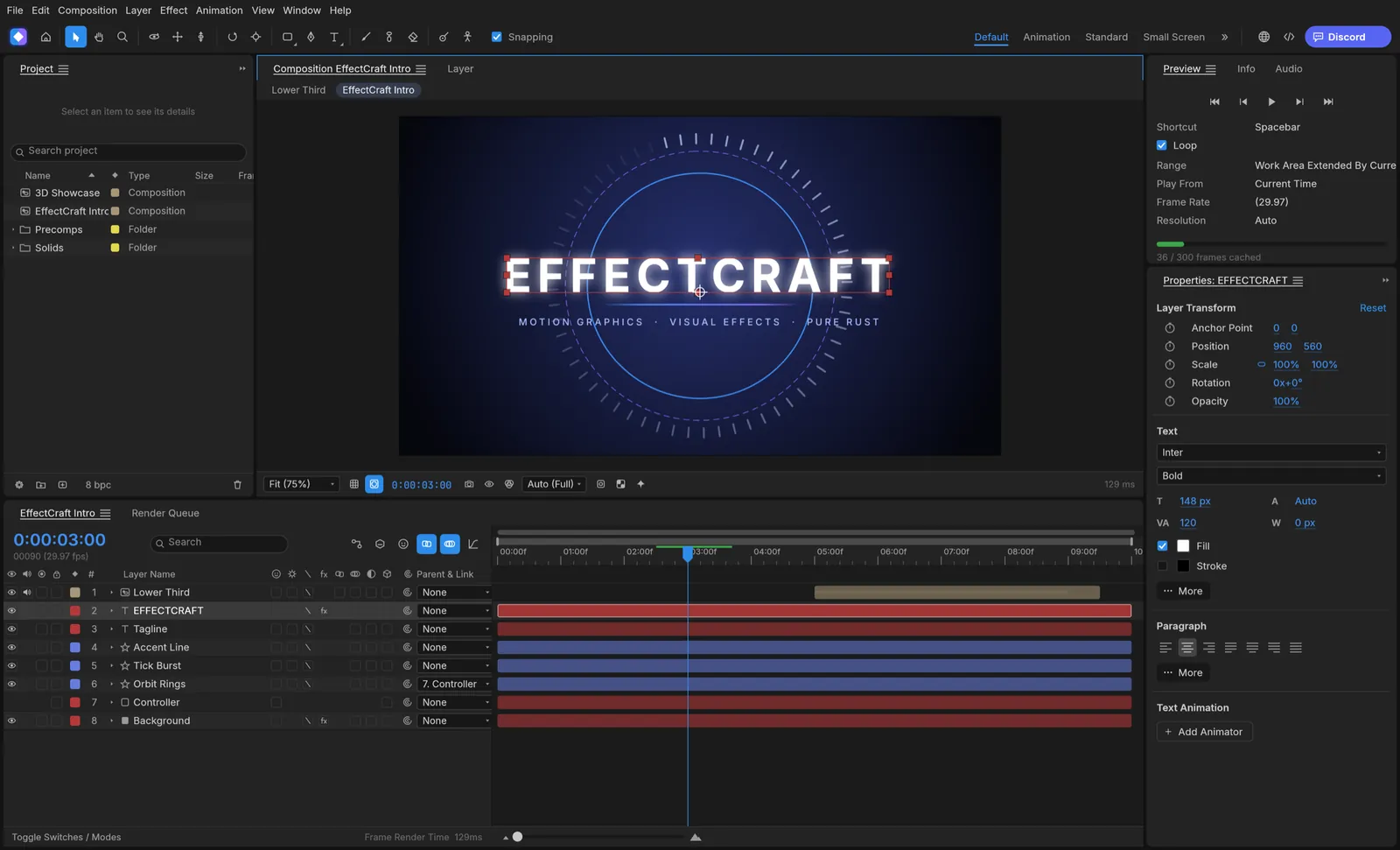
EffectCraft 主要功能
合成与图层
纯色、形状、文字、素材、嵌套合成、空对象、摄像机和灯光,时间线快捷键与 AE 一致。
306 种效果
模糊、抠像、扭曲、模拟(粒子世界、碎片、焦散等)、音频、文字和实用工具类效果。
表达式
使用 After Effects 对象模型的 JavaScript 表达式,支持 wiggle、loopOut 等。
内置 Lottie
导入导出 Lottie JSON,动画可直接用于网页和 App。
操控点与蒙版
操控点工具、带修剪路径和中继器的形状图层、蒙版和时间重映射。
不依赖 FFmpeg
纯 Rust 编码输出 ProRes(最高 4444 XQ 含 Alpha)、HEVC、AV1 和 VP9。
我们实际装了 EffectCraft:首次运行记录
测试版本 EffectCraft 0.11.1 · 2026年10月20日 · Ubuntu 24.04,4 核虚拟 CPU,16 GB 内存,无独立显卡(软件渲染) · 我们怎么测试
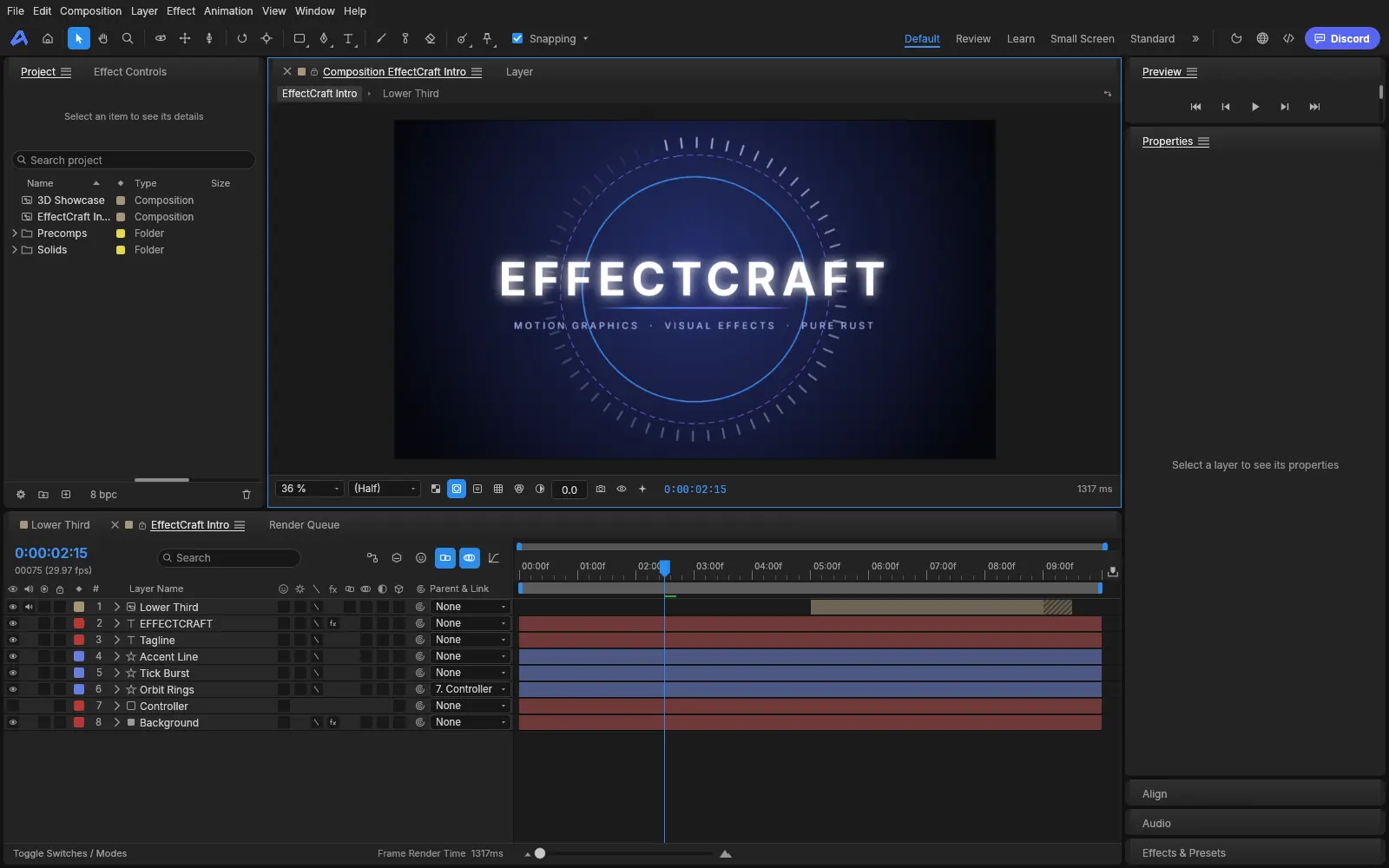
- 示例工程有八个带动画的图层(文字、形状、控制用空对象),打开就是类似 After Effects 的合成界面。
- 在没有 GPU 的测试机上,预览一帧大约要 1.3 秒(状态栏显示 1317 ms)。想流畅预览,需要真正的显卡。
EffectCraft vs Adobe After Effects
EffectCraft 能否替代 After Effects?下面是关键差异。
| EffectCraft | Adobe After Effects | |
|---|---|---|
| 价格 | 免费 | 付费订阅(Creative Cloud) |
| 许可证 | 开源(Apache-2.0) | 闭源商业软件 |
| 平台 | Windows、macOS、Linux、FreeBSD、网页 | Windows、macOS |
| 文件格式 | Lottie JSON(导入/导出)、ProRes MOV、HEVC、AV1、VP9;原生 .ecproj(JSON)。无法打开 .aep/.aepx。 | After Effects 原生格式 |
| 账号 / 云端 | 无需账号,离线可用,无遥测 | 需要 Adobe 账号 |
| AI 智能体控制 | 内置 CLI 与 MCP 服务器 | — |
| 成熟度 | 项目很年轻、迭代很快。无法打开 AE 工程(.aep),也不能运行 AE 插件;macOS 是测试最充分的平台。 | 行业标准,成熟稳定 |
免费开源的 After Effects(AE)替代
EffectCraft 全部下载文件 · v0.25.1
所有文件均直接链接到官方 GitHub Releases,本站不托管任何安装包。第三方镜像站往往落后好几个版本,也无法保证文件未被改动。
Windows 安装帮助 →
| 格式 | 架构 | 大小 |
|---|---|---|
| 便携版 (.zip) effectcraft-0.25.1-windows-arm64-portable.zip | ARM64 | 82.3 MB |
| 安装包 (.msi) effectcraft-0.25.1-windows-arm64.msi | ARM64 | 59.8 MB |
| 便携版 (.zip) effectcraft-0.25.1-windows-x64-portable.zip | x64 / x86_64 | 89.6 MB |
| 安装包 (.msi) effectcraft-0.25.1-windows-x64.msi | x64 / x86_64 | 67.2 MB |
macOS 安装帮助 →
| 格式 | 架构 | 大小 |
|---|---|---|
| 磁盘映像 (.dmg) effectcraft-0.25.1-macos-universal.dmg | 通用(Apple 芯片 + Intel) | 86.3 MB |
| CLI · 压缩包 (.zip) effectcraft-cli-0.25.1-macos-universal.zip | 通用(Apple 芯片 + Intel) | 81.3 MB |
Linux 安装帮助 →
| 格式 | 架构 | 大小 |
|---|---|---|
| AppImage effectcraft-0.25.1-linux-aarch64.AppImage | ARM64 | 73.3 MB |
| Debian / Ubuntu (.deb) effectcraft-0.25.1-linux-aarch64.deb | ARM64 | 83.3 MB |
| Flatpak effectcraft-0.25.1-linux-aarch64.flatpak | ARM64 | 48.4 MB |
| 压缩包 (.tar.gz) effectcraft-0.25.1-linux-aarch64.pkg.tar.zst | ARM64 | 55.9 MB |
| Fedora / openSUSE (.rpm) effectcraft-0.25.1-linux-aarch64.rpm | ARM64 | 82.5 MB |
| 压缩包 (.tar.gz) effectcraft-0.25.1-linux-aarch64.tar.gz | ARM64 | 79.5 MB |
| Debian / Ubuntu (.deb) effectcraft-0.25.1-linux-riscv64.deb | — | 84.8 MB |
| Fedora / openSUSE (.rpm) effectcraft-0.25.1-linux-riscv64.rpm | — | 84.6 MB |
| 压缩包 (.tar.gz) effectcraft-0.25.1-linux-riscv64.tar.gz | — | 83.0 MB |
| AppImage effectcraft-0.25.1-linux-x86_64.AppImage | x64 / x86_64 | 78.9 MB |
| Debian / Ubuntu (.deb) effectcraft-0.25.1-linux-x86_64.deb | x64 / x86_64 | 87.6 MB |
| Flatpak effectcraft-0.25.1-linux-x86_64.flatpak | x64 / x86_64 | 55.1 MB |
| 压缩包 (.tar.gz) effectcraft-0.25.1-linux-x86_64.pkg.tar.zst | x64 / x86_64 | 59.6 MB |
| Fedora / openSUSE (.rpm) effectcraft-0.25.1-linux-x86_64.rpm | x64 / x86_64 | 87.0 MB |
| 压缩包 (.tar.gz) effectcraft-0.25.1-linux-x86_64.tar.gz | x64 / x86_64 | 85.6 MB |
FreeBSD
| 格式 | 架构 | 大小 |
|---|---|---|
| 压缩包 (.tar.gz) effectcraft-0.25.1-freebsd-aarch64.tar.gz | ARM64 | 82.5 MB |
| 压缩包 (.tar.gz) effectcraft-0.25.1-freebsd-x86_64.tar.gz | x64 / x86_64 | 84.9 MB |
网页版 (WebAssembly)
| 格式 | 架构 | 大小 |
|---|---|---|
| 压缩包 (.zip) effectcraft-web-0.25.1.zip | — | 23.7 MB |
更新内容: EffectCraft v0.25.1
v0.25.1 · 发布于 2026年11月23日
Highlights
- After Effects compatibility: .aep import is twice as fast and handles huge or hostile files without stalling, keeps effects it can't map as placeholders, and imports text animator Stroke Opacity and Source Text expressions. Dozens of effect parameters now take After Effects' ranges, and Ball Grid gets every CC Ball Action control.
- Media: video and audio decoding moved to the shared Craft media libraries, with many import fixes (ProRes alpha, MOV timecode and audio edits, Matroska aspect and duration, MXF, AVI and FLAC).
- Caching rebuilt: footage is decoded once, all caches share one memory budget, and idle caching is on. Closing a project frees its memory.
- Editing: the Graph Editor follows the theme and draws curves through every keyframe, number fields accept arithmetic (960/2), Effect Controls can be locked to a layer, the Composition viewer has a 1 | 2 | 4 views switch, and reversed layers play their audio backwards.
- Fixes: file dialogs that can't open are errors instead of crashes, Warp Stabilizer and 3D Camera Tracker analyses survive offline footage and older projects, and LUT and OCIO files are re-read when they change on disk.
What's Changed
- Export, Media: codecs and containers from craft-libs; remove hevcenc, av1enc, vp9enc by @dylanmtaylor in https://github.com/storytold/effectcraft/pull/3522
- #2796: ScriptUI panel bars hide while the window fits its dock by @arnav-hiwarkar in https://github.com/storytold/effectcraft/pull/2880
- Warp Stabilizer, 3D Camera Tracker: keep analyses saved before 0.23 (#3456) by @arnav-hiwarkar in https://github.com/storytold/effectcraft/pull/3530
- Apply Color LUT and Lumetri follow a LUT file that changes on disk (#3493) by @arnav-hiwarkar in https://github.com/storytold/effectcraft/pull/3533
- .aep import: an item made from one Photoshop layer shows that layer (#3087) by @arnav-hiwarkar in https://github.com/storytold/effectcraft/pull/3449
- Expressions, Scripting: a layer's property numbers and match names follow After Effects (#3528) by @GenuineMoron in https://github.com/storytold/effectcraft/pull/3529
- .aep import: keep effects without a counterpart as placeholders (#3087) by @arnav-hiwarkar in https://github.com/storytold/effectcraft/pull/3450
- Warp Stabilizer, 3D Camera Tracker, Roto Brush: one explicit analysis key; offline footage keeps analyses (#3534, #3536) by @arnav-hiwarkar in https://github.com/storytold/effectcraft/pull/3550
- Import: a 3D model's left-out textures reach the user as an import warning by @dylanmtaylor in https://github.com/storytold/effectcraft/pull/3523
- Text layout: a wrapped line finds its glyphs and end caret by bisection by @dylanmtaylor in https://github.com/storytold/effectcraft/pull/3506
- Timewarp: bound the motion search's total work by coarsening the vector grid by @dylanmtaylor in https://github.com/storytold/effectcraft/pull/3505
- Export: Skip Existing keeps a frame already in the overflow folder by @dylanmtaylor in https://github.com/storytold/effectcraft/pull/3500
- Convert Expression to Keyframes: refuse layers of more than 2^18 frames by @dylanmtaylor in https://github.com/storytold/effectcraft/pull/2999
- Media: check still, EXR channel, GIF and WebP canvas sizes before allocating by @dylanmtaylor in https://github.com/storytold/effectcraft/pull/2993
- Render: memoized audio detection, bounded stretch, preroll, waveform, cache entries, 3D bounds, solids and selector time by @dylanmtaylor in https://github.com/storytold/effectcraft/pull/2988
- Automation: refuse Watch Folder and Edit Original while file access is confined by @dylanmtaylor in https://github.com/storytold/effectcraft/pull/2983
- FBX: records stay within their parent; textures, materials and links are indexed by @dylanmtaylor in https://github.com/storytold/effectcraft/pull/2955
- Viewers show footage reloaded with unchanged metadata (#3539) by @arnav-hiwarkar in https://github.com/storytold/effectcraft/pull/3561
- OCIO File Transform and custom OCIO configs follow their files on disk (#3538) by @arnav-hiwarkar in https://github.com/storytold/effectcraft/pull/3560
- Warp Stabilizer, 3D Camera Tracker: analysis keys cover masks, effects above and precomp contents (#3535) by @arnav-hiwarkar in https://github.com/storytold/effectcraft/pull/3564
- Effects: 18 parameters take After Effects' valid ranges (Levels IC, 4-Color Gradient, Change Color, Noise HLS, Grid, Venetian Blinds, Radial Wipe, Scatter, Beam, Transform, Turbulent Displace) by @arnav-hiwarkar in https://github.com/storytold/effectcraft/pull/3571
- 3D models: bound and share decoded textures, share skin matrices, index OBJ materials by @dylanmtaylor in https://github.com/storytold/effectcraft/pull/2965
- Fix opening and closing manually drawn paths by @arnav-hiwarkar in https://github.com/storytold/effectcraft/pull/2876
- Fix Effect Controls arrow-key collapse and expand (#2869) by @arnav-hiwarkar in https://github.com/storytold/effectcraft/pull/2875
- SVG: support static pattern fills and strokes by @slager2 in https://github.com/storytold/effectcraft/pull/2732
- .aep import: a test pins the Orientation expression import (#3087) by @vangel76 in https://github.com/storytold/effectcraft/pull/3313
- .aep import/export: text animator Stroke Opacity and Source Text expressions (#3170) by @vangel76 in https://github.com/storytold/effectcraft/pull/3305
- .aep: import twice as fast, faster export by @vangel76 in https://github.com/storytold/effectcraft/pull/3302
- test: resolve xtask from relocated nextest archives by @skylartaylor in https://github.com/storytold/effectcraft/pull/3322
- ci: limit concurrent GPU tests in nextest by @skylartaylor in https://github.com/storytold/effectcraft/pull/3323
- Scripting: ParagraphJustification has After Effects' numbers (#3608) by @GenuineMoron in https://github.com/storytold/effectcraft/pull/3610
…
EffectCraft 常见问题
项目很年轻、迭代很快。无法打开 AE 工程(.aep),也不能运行 AE 插件;macOS 是测试最充分的平台。
EffectCraft 能打开 AE 的 .aep 工程吗?
不能。EffectCraft 使用自己的可读 .ecproj(JSON)工程格式,无法打开 .aep/.aepx 文件,AE 插件也不能运行。
EffectCraft 能导出 Lottie 动画吗?
可以。内置 Lottie 导入和导出(文件 ▸ 导出 ▸ Lottie JSON…),支持预合成、形状和文字。
ArtCraft 的这些应用免费吗?
免费。13 款 Crafting Apps 和 ArtCraft Launcher 全部开源,采用 MIT 或 Apache-2.0 双许可证,下载和使用都不收费,也不需要账号。官方网站 getartcraft.com 上的付费订阅是给 ArtCraft 的 AI 图像/视频工作室用的,这些 Crafting Apps 本身并不需要订阅。
下载安全吗?
只要从官方 GitHub 仓库(github.com/storytold)下载就是安全的。本站所有下载按钮都直接指向官方 GitHub Releases,不经过任何第三方。官方 Windows 安装包有代码签名,macOS 版本经过签名和 Apple 公证,每个版本还附带 SHA256SUMS.txt 用于校验。注意:GitHub 上已经出现了一些自称“下载器 / 安装器”的仿冒仓库,请不要下载。详细说明。
和 Adobe、微软有关系吗?
没有。这些应用由 ArtCraft 团队开发,是对 Adobe、Microsoft Office、AutoCAD、Pro Tools、Figma 等软件工作流程的“净室”重新实现,与这些公司没有任何关联,也未获其认可。本站(CraftSuite)同样是非官方的独立指南站。全部免费替代请看 Adobe 替代品对照表 和 Office 替代品对照表。
推广
CraftSuite 团队的另外两款工具
生成背景、纹理和短视频素材,直接合成进你的镜头。
 AiLoft一站式 AI 图片与视频生成工具
- GPT Image 2、Nano Banana Pro 和视频模型一处搞定
- 最高 4K 输出,可商用
- 不用显卡、不用安装,打开浏览器就能用
 PixelSniff这张图是不是 AI 生成的?几秒就知道
- 多个检测模型综合给出一个清晰的 AI 概率
- 深度分析:标出疑似 AI 区域、检查水印和元数据,生成详细报告
- 识别 Midjourney、DALL·E、Stable Diffusion、Flux、Gemini 及深度伪造
其他 ArtCraft 应用
 Mister Download ManagerIDM 替代
- PhotoCraftPhotoshop 替代
- VectorCraftIllustrator 替代
- FilmCraftPremiere Pro 替代
- LightCraftLightroom 替代
- PdfCraftAcrobat 替代
- DesignCraftInDesign 替代
- WordCraftWord 替代
- GridCraftExcel 替代
- DeckCraftPowerPoint 替代
- CADCraftAutoCAD 替代
- SoundCraftPro Tools 替代
- FigCraftFigma 替代
- ArtCraft Launcher一键安装、更新全部应用