Calendar icon

Puter Calendar: a free, open-source Google Calendar alternative

Year, month, week, day and list views with recurring events, reminders and guest RSVPs.

  • Collaboration
  • Free · MIT
  • Runs in the browser
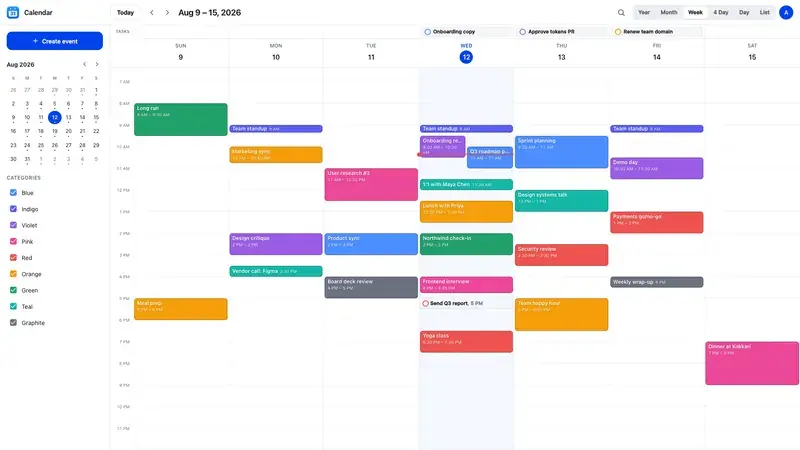
Calendar screenshot
Calendar interface. Screenshot from the official HeyPuter/everything repository.

What is Calendar?

Calendar is a complete, fast calendar in the browser. Six views cover every way you plan, events can repeat on any schedule, and you can drag to reschedule. Invite guests with an RSVP link, get browser reminders, and import or export iCalendar files. Install it to your home screen and it opens offline.

Key features

  • Year, month, week, four-day, day and list views
  • Recurring events — edit one, this and following, or the whole series
  • Drag to move and resize events
  • Guest invitations with RSVP links
  • iCalendar (.ics) and JSON import / export, offline support

How to use it

  1. Open calendar.puter.com in any modern browser — computer, tablet or phone.
  2. Sign in with a free Puter account; your data is saved in your own Puter cloud storage.
  3. Want to self-host or hack on it? Run it locally (Node.js 22.12 or newer):
git clone https://github.com/HeyPuter/everything.git
cd everything/src/calendar
npm install
npm run dev

More collaboration apps

See all 51 Everything apps →

Replaces Zoom · Google Meet · Microsoft Teams

Video meetings with shareable links — audio and video flow peer-to-peer.

Teamchat

alpha

Replaces Slack · Microsoft Teams · Google Chat

Team messaging with workspaces, channels, threads, DMs, reactions and file sharing.

Replaces Gmail · Microsoft Outlook · Apple Mail

A fast, private email client for your free @puter.email address.

Replaces Google Contacts · Apple Contacts

A private address book in your own cloud — instant search, Smart Add and vCard import/export.

Replaces DocuSign · Adobe Acrobat Sign · Dropbox Sign

Send documents for e-signature, track every signer and get a signed PDF with a certificate.

FAQ

Is Calendar free?

Yes. Calendar is part of the Everything Project and its source code is published on GitHub under the MIT license. There is no subscription or trial.

Do I need to install Calendar?

No. Open calendar.puter.com in the browser on your computer, tablet or phone.

Do I need an account to use Calendar?

A free Puter account. Your data is stored in your own Puter cloud storage.

Can Calendar replace Google Calendar?

For most everyday work, yes: year, month, week, four-day, day and list views; recurring events — edit one, this and following, or the whole series; drag to move and resize events. If you depend on a specialised Google Calendar feature, test it with your own files first.

Summarised from Calendar’s README in the official repository. CraftSuite is an independent, unofficial guide and is not affiliated with Puter; Google Calendar, Apple Calendar and Outlook Calendar are trademarks of their respective owners.

Your download has started

Install

Star on GitHub Join the Discord

While it downloads — two more tools from our team Sponsored

AiLoft · All-in-one AI image & video studioFree credits on sign-up · one-time packs that never expire, save up to 20% PixelSniff · Is this image AI-generated? Find out in seconds5 free checks a day, no sign-up · free credits for deep reports

Download didn’t start? Try again