

Play backgammon against the computer or a friend, on one device or online.

Puter Chess: play free in your browser
Play chess against the computer at three levels, pass and play, or invite a friend online.
- Games
- Free · MIT
- Runs in the browser
- No sign-up needed
What is Chess?
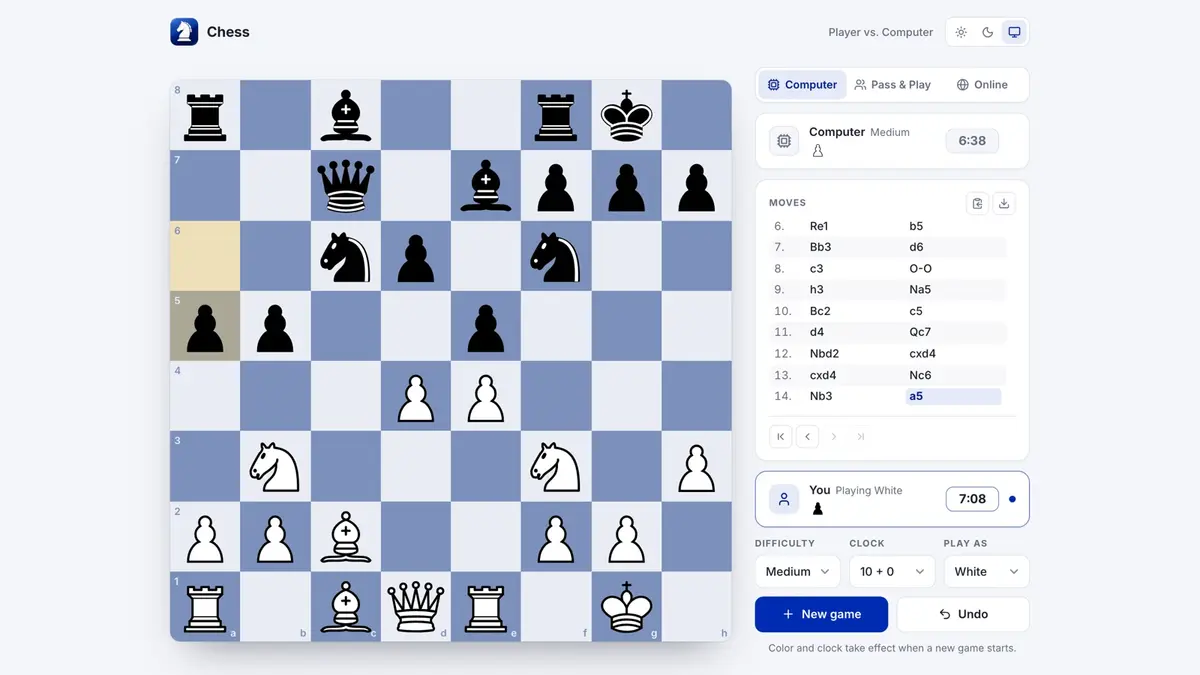
Chess runs entirely in your browser — nothing to download, nothing to set up. Play the computer at Easy, Medium or Hard, hand one device back and forth, or send a friend a private online game. Every rule is enforced, clocks are accurate, and finished games can be replayed and downloaded as PGN.
Key features
- Computer opponent at Easy, Medium and Hard
- Pass and play, or private online games with a code or link
- Eight time controls from 1+0 bullet to 15+10 rapid
- Move hints, algebraic notation and captured pieces
- Replay any game and export PGN
How to use it
- Open chess.puter.com in any modern browser — computer, tablet or phone.
- Start right away — no sign-up. Sign in with a free Puter account only if you want to save to the cloud.
- Want to self-host or hack on it? Run it locally (Node.js 22.12 or newer):
git clone https://github.com/HeyPuter/everything.git
cd everything/src/chess
npm install
npm run devMore games apps

American checkers against the computer or a friend — free, in your browser.

Replaces Microsoft Solitaire Collection
Classic Klondike and Spider solitaire — unlimited undo, works offline.

Four difficulty levels, daily puzzles and hints that explain the logic.
FAQ
Is Chess free?
Yes. Chess is part of the Everything Project and its source code is published on GitHub under the MIT license. There is no subscription or trial.
Do I need to install Chess?
No. Open chess.puter.com in the browser on your computer, tablet or phone.
Do I need an account to use Chess?
Not required. It works straight away and keeps data in your browser or on your device; sign in with a free Puter account to save to the cloud.
Can Chess replace Chess.com?
For most everyday work, yes: computer opponent at Easy, Medium and Hard; pass and play, or private online games with a code or link; eight time controls from 1+0 bullet to 15+10 rapid. If you depend on a specialised Chess.com feature, test it with your own files first.
Summarised from Chess’s README in the official repository. CraftSuite is an independent, unofficial guide and is not affiliated with Puter; Chess.com and Lichess are trademarks of their respective owners.