Accounting icon

Puter Accounting: a free, open-source QuickBooks Online alternative

Double-entry bookkeeping for small businesses: invoices, bills, bank feeds, reconciliation and reports.

  • Finance
  • Free · MIT
  • Runs in the browser
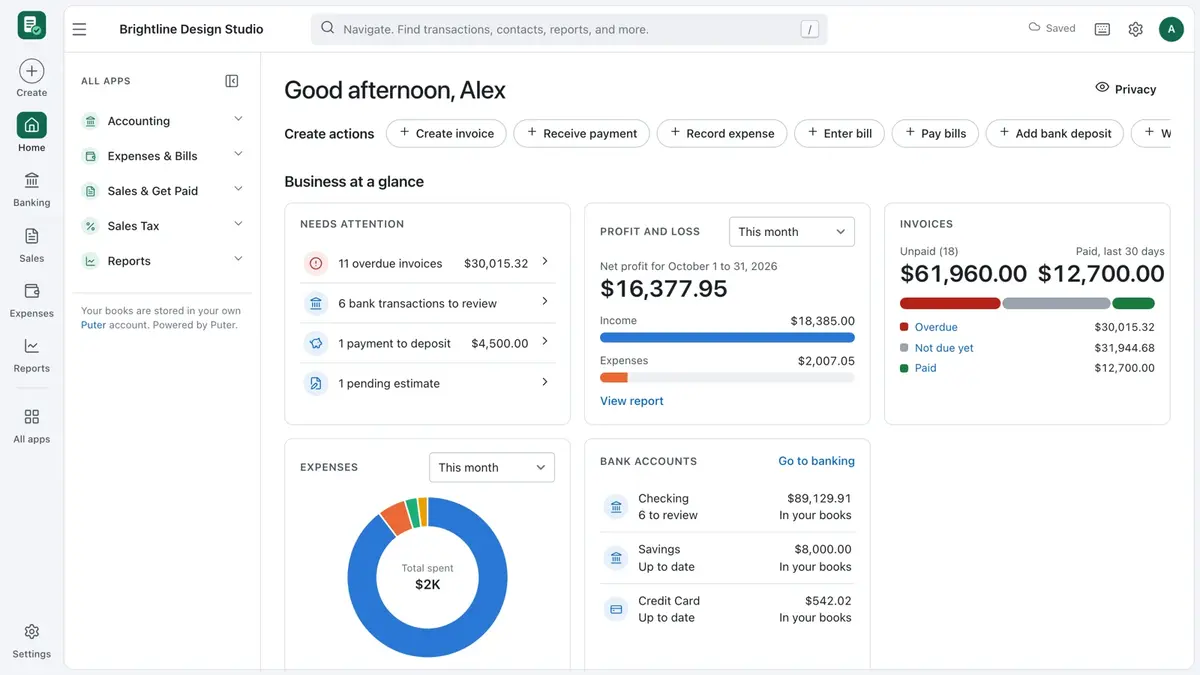
Accounting screenshot
Accounting interface. Screenshot from the official HeyPuter/everything repository.

What is Accounting?

Accounting does the work small businesses usually pay QuickBooks or Xero for. Send invoices and estimates, enter bills and expenses, import bank statements (CSV or OFX/QFX), categorise lines with bank rules, reconcile accounts and run Profit & Loss, Balance Sheet and Cash Flow reports. A sample company lets you explore first.

Key features

  • Invoices, estimates, sales receipts, credit memos and payments
  • Bills, expenses, checks and purchase orders
  • Bank import (CSV, OFX, QFX, QBO), bank rules and reconciliation
  • P&L, Balance Sheet, Cash Flow, aging and sales-tax reports
  • Recurring transactions, closing date, audit log and backups

How to use it

  1. Open accounting.puter.com in any modern browser — computer, tablet or phone.
  2. Sign in with a free Puter account; your data is saved in your own Puter cloud storage.
  3. Want to self-host or hack on it? Run it locally (Node.js 22.12 or newer):
git clone https://github.com/HeyPuter/everything.git
cd everything/src/accounting
npm install
npm run dev

More finance apps

See all 51 Everything apps →

Replaces FreshBooks · Zoho Invoice · Wave Invoicing

Quotes, invoices, recurring invoices, receipts and payment links — simpler than full accounting.

Expenses

Source only

Replaces Expensify · SAP Concur · Zoho Expense

Snap a receipt and AI fills in the expense — then build reports and reconcile card statements.

Replaces Carta · Pulley

Track startup ownership, run equity plans, model fundraising and explore exit scenarios.

FAQ

Is Accounting free?

Yes. Accounting is part of the Everything Project and its source code is published on GitHub under the MIT license. There is no subscription or trial.

Do I need to install Accounting?

No. Open accounting.puter.com in the browser on your computer, tablet or phone.

Do I need an account to use Accounting?

A free Puter account. Your data is stored in your own Puter cloud storage.

Can Accounting replace QuickBooks Online?

For most everyday work, yes: invoices, estimates, sales receipts, credit memos and payments; bills, expenses, checks and purchase orders; bank import (CSV, OFX, QFX, QBO), bank rules and reconciliation. If you depend on a specialised QuickBooks Online feature, test it with your own files first.

Summarised from Accounting’s README in the official repository. CraftSuite is an independent, unofficial guide and is not affiliated with Puter; QuickBooks Online, Xero and Wave Accounting are trademarks of their respective owners.

Your download has started

Install

Star on GitHub Join the Discord

While it downloads — two more tools from our team Sponsored

AiLoft · All-in-one AI image & video studioFree credits on sign-up · one-time packs that never expire, save up to 20% PixelSniff · Is this image AI-generated? Find out in seconds5 free checks a day, no sign-up · free credits for deep reports

Download didn’t start? Try again